> For the complete documentation index, see [llms.txt](https://docs.flatredball.com/gum/llms.txt). Markdown versions of documentation pages are available by appending `.md` to page URLs; this page is available as [Markdown](https://docs.flatredball.com/gum/code/controls/button.md).
# Button
## Introduction
The Button control providing an event for handling clicks.
`Click`, not `Push`, is the primary event for reacting to button activation. Its timing depends on the input device:
* **Mouse or touch** - `Click` fires on release, after a matching push over the same button. The cursor can leave and return before releasing; see [Click](/gum/code/gum-code-reference/interactivegue/click.md) for details.
* **Keyboard or gamepad** - `Click` fires immediately when the activation key or button is pressed, with no release-based confirmation.
## Code Example: Adding a Button
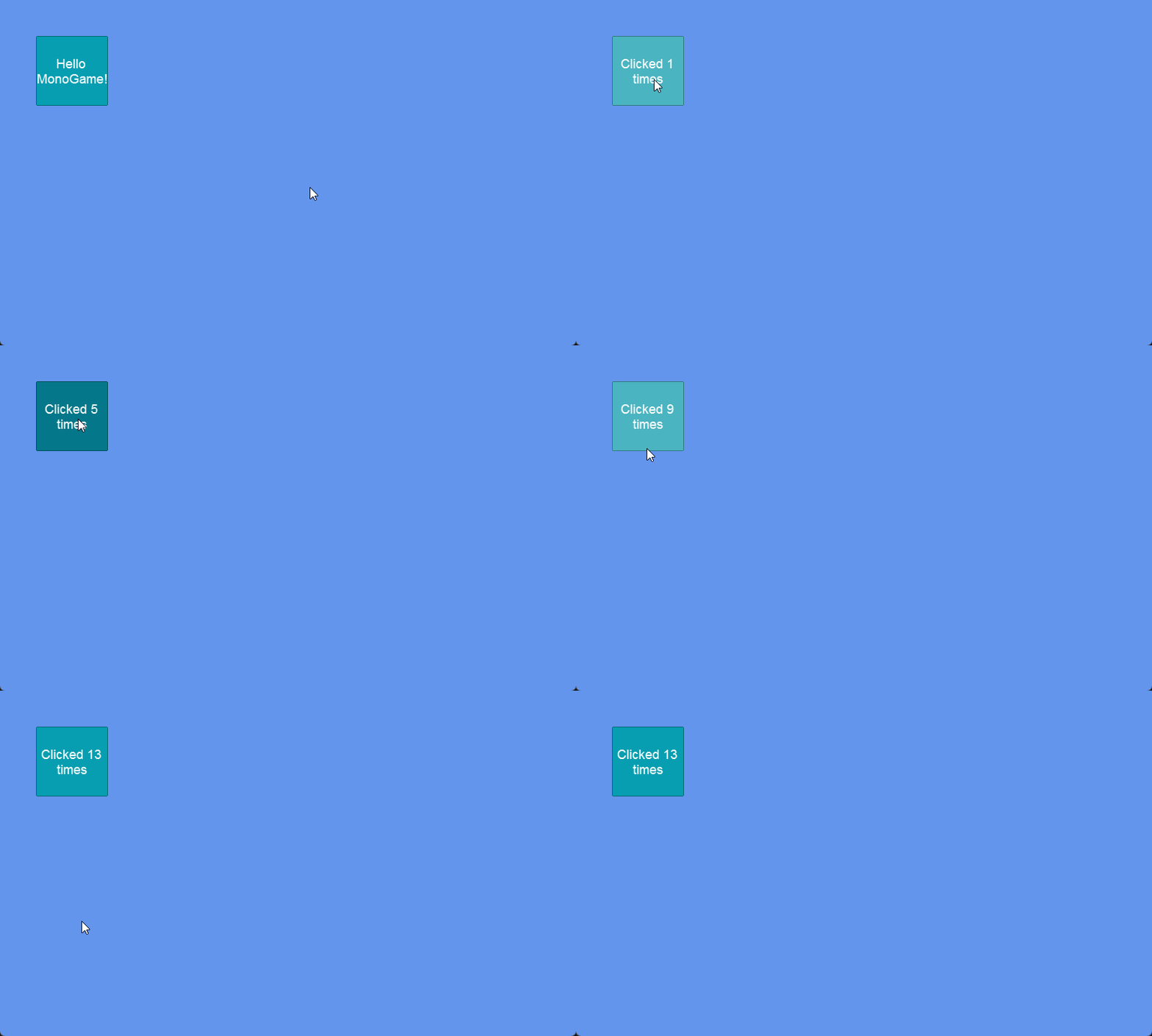
The following code adds a button which increments every time it is clicked:
{% tabs %}
{% tab title="Separate Method" %}
```csharp
Button button;
void SomeInitializationFunction()
{
...
button = new Button();
button.AddToRoot();
button.X = 50;
button.Y = 50;
button.Width = 100;
button.Height = 50;
button.Text = "Hello MonoGame!";
int clickCount = 0;
button.Click += HandleClick
}
void HandleClick(object sender, EventArgs args)
{
clickCount++;
button.Text = $"Clicked {clickCount} times";
}
```
[Try on XnaFiddle.NET](https://xnafiddle.net/#snippet=H4sIAAAAAAAACl2QP2vDMBDFd4O_w1V0SHAo6dClJkMaStyhSwm0BS22dSRqpRNYclpq_N2rP4aYaJB0Pz09vdOQZwDsxe57zR7BdT2uItGoG-ysZ-ypd84QNHEpOUly0CrZfu9M77cbWHvI6WykgKomoXAXThem-cLWgUUS2K3g-Yzktt3RQu2nJaeBE_hxsSqKMqH01N0Bf4P9LWfREAUMF_EITmq0nPk7I0uhJUknayX_MOROLt6A8AdSE4ulV0_uWyEO5s0YN4cfXv4Q-pnqz6v6XQp38ux-PYMVyuMpJJ0rp_CcVaiUgVdDZl9rvImBJ01sC4rN_NtKlmdjnv0DxahSepgBAAA)
{% endtab %}
{% tab title="Lambda" %}
```csharp
// Initialize
var button = new Button();
button.AddToRoot();
button.X = 50;
button.Y = 50;
button.Width = 100;
button.Height = 50;
button.Text = "Hello MonoGame!";
int clickCount = 0;
button.Click += (_, _) =>
{
clickCount++;
button.Text = $"Clicked {clickCount} times";
};
```
[Try on XnaFiddle.NET](https://xnafiddle.net/#snippet=H4sIAAAAAAAACl3NMYvCQBAF4D6Q__BuuUJJEK-wUSLcWaiFjQinsCDRDGa4ZBd0omLIf79NLBLdat_He0zpe4BaXuZFrsaQc0FhI2xYOM74QY7VNT7jUIhYgwiGbvhpQq8_0ebpg-8k2di1tdLFrauPhm3eveVfTiR19jXs4IL4lMpbc0P3mrRaUJZZrKyx8zinD61ch43gmPHxb2YL943QGc5qRxChtw-x7yOaalNqA_faSRC4QU2v1z61auaUoGzLFYRzujSXq4nyvcr3_gEi64GGRwEAAA)
{% endtab %}
{% endtabs %}
Button responding to clicks by incrementing clickCount
## Clicking Programmatically
Clicking can be performed programmatically by calling `PerformClick`. The following example shows how to click a button when the Enter key is pressed. The Click handler updates the button text with the current time:
```csharp
// Initialize
button.Click += HandleClick;
// ...
void HandleClick(object sender, EventArgs args)
{
button.Text = $"Clicked at {DateTime.Now:T}";
}
```
```csharp
// Update
var keyboard = GumService.Default.Keyboard;
if(keyboard.KeyPushed(Gum.Forms.Input.Keys.Enter))
{
button.PerformClick();
}
```
[Try on XnaFiddle.NET](https://xnafiddle.net/#snippet=H4sIAAAAAAACCmVRUU_CMBD-K5fFhy0hzSTxBcIDCAoxGqJLxGQv3XqDytaS9jpUwn-3bFMJ9qHNXb_77vvuDsHC3rsqGJBx2AsqrDI0NhgEE0ekFWTNM0xVqmotBcy5EiXeljLfhjp7x5zAohJoejCrUdHYrC1wf0WpOqQK_GkpWIIfBCO4Sl0c9_sNAwrgBIcpJ0xkhexJ7wfJsQX4lsegF0glSfJSfqHX1DJ5EoV7aAWGkQd2HcZCJPpZazpPrjz8Jv6L3y7iVylo43PX8VlyjnK9oQtkZ6CVtzRoLcwUoQHSkJ_s_ArvChqPLX4yOp_c0BtzO-Fte1M1N7DFz0xzIzy9X8YLmlrmyKZYcFcSe-h-PbMswh_sKb10doMifJS50VYXxFaKszvDK9xrs2ULtXNNuWWN0ujfUpZoCm2qdp9RM_PjN-gHLUoTAgAA)
Optionally you can pass the input device to the `PerformClick` method. The input device is then available in the Click handler through `InputEventArgs`, which is useful to determine how the button was activated:
```csharp
// Initialize
button.Click += HandleClick;
// ...
void HandleClick(object sender, EventArgs args)
{
var device = "Unknown";
if (args is Gum.Wireframe.InputEventArgs inputEventArgs)
{
if (inputEventArgs.InputDevice is Gum.Input.Keyboard)
device = "Keyboard";
else if (inputEventArgs.InputDevice is Gum.Input.GamePad)
device = "GamePad";
}
button.Text = $"Clicked at {DateTime.Now:T} via {device}";
}
```
```csharp
// Update
var keyboard = GumService.Default.Keyboard;
if(keyboard.KeyPushed(Gum.Forms.Input.Keys.Enter))
{
button.PerformClick(keyboard);
}
```
[Try on XnaFiddle.NET](https://xnafiddle.net/#snippet=H4sIAAAAAAACCp1TTWvjMBD9K4PpwYZg0sJeEnpom36xdAnblLbgi2KNG23sUZFkZ9vg_96R5dRJLgurg82Mn968mXneRvf2tq6iiTM1jqIKqyUaG02iy9o5TbDsXtOMMmq0knAnSJZ4Vap8HevlH8wdWCSJZgTXDZK7MG8WBD-SjLYZAZ9GGJDYqBzhHLJ6PD47e6I16Q2FYBpgqoDYXwRlgRWlz8pgYUSF6T29125gVwdhEm73tXZEh5jAMAsamP5Bk75lZl-m-5T-xI-lFkYmA40_R7J3qAPd_mBp8b_q-mgu_lG2Bx1UbcMrrCdd4F_H8JMA6baDEoSD7Uw4XCge4i-9mSxaaJSAbeBvvwnbaBQpUk6JUn0iLz_QMiPhBoIT4oSBfbkLKRf6t9ZuP_nC8B_jIX49ip-VdCvOnY73kneo3lbuCNl3E-TNDVoL1-TQgNOQ-96-hfcXuoYD_vJ836JTbqx-lzwDbsr7cN1vkOl5CY9o_CDSGRaiLgcXMLMq4h3Wp-e1XaGMH1RutNWFS19IpDfenRtt1oOJbNopTQb39xLnaAptqvDj7JiTbvbtFxjUizmEAwAA)
## Animating on Hover
A button changes between its **Enabled**, **Highlighted**, **Pushed**, and **Disabled** states automatically and instantly. To play a keyframe animation when the button is highlighted (for example, growing or shrinking on hover), subscribe to the visual's `RollOn` and `RollOff` events and call `PlayAnimation`. See [Playing Animations on Hover or Highlight](/gum/code/animationruntime.md#playing-animations-on-hover-or-highlight) for details.
---
# Agent Instructions
This documentation is published with GitBook. GitBook is the documentation platform designed so that both humans and AI agents can read, navigate, and reason over technical content effectively. Learn more at gitbook.com.
## Querying This Documentation
If you need additional information that is not directly available in this page, you can query the documentation by asking a question.
Perform an HTTP GET request on the following URL with the `ask` and `goal` query parameters:
```
GET https://docs.flatredball.com/gum/code/controls/button.md?ask=&goal=
```
`ask` is the immediate question: it should be specific, self-contained, and written in natural language.
`goal` is what the user is ultimately trying to achieve, the reason they need the answer. Sharing it helps GitBook give you a better, more relevant answer. A goal is most helpful when it describes the outcome the user wants rather than restating the question. For example, with `ask=how do I create an API token`, a goal like `automate deployments from our CI pipeline` lets GitBook tailor the answer to that use case.
The response will contain a direct answer to the question and relevant excerpts and sources from the documentation.
Use this mechanism when the answer is not explicitly present in the current page, you need clarification or additional context, or you want to retrieve related documentation sections.