> For the complete documentation index, see [llms.txt](https://docs.flatredball.com/gum/llms.txt). Markdown versions of documentation pages are available by appending `.md` to page URLs; this page is available as [Markdown](https://docs.flatredball.com/gum/code/controls/combobox.md).
# ComboBox (Dropdown)
## Introduction
The ComboBox control provides a compact way for users to select from a list of options.
## Code Example: Adding a ComboBox
```csharp
// Initialize
var comboBox = new ComboBox();
comboBox.AddToRoot();
for(int i = 0; i < 10; i++)
{
comboBox.Items.Add($"Item {i}");
}
```
[Try on XnaFiddle.NET](https://xnafiddle.net/#snippet=H4sIAAAAAAAACqvm5VJQUPIsdi_NVbJSKCkqTdUBi2TmZZZkJuZkVqUChZXKEosUkvNzk_Kd8isUbBXyUssVnKFcDU3rmDyYnJ5jSkpIflB-fglYOC2_SCMzr0QhE6jHwBpI2SgYgmhtbc2YvOqYPAUggGv1LEnNLQYZoKESowTiKFRn1sYogcypVeLlquXlAgAcjglhrAAAAA)
ComboBox displaying a list of items
{% hint style="info" %}
ComboBox's internal ListBox is hidden until the dropdown opens, so Gum automatically skips layout when adding items. This means adding hundreds of items to a ComboBox is fast without any extra code. If you are adding many items to a visible ListBox or other ItemsControl, see [Reducing Layout Calls](/gum/code/performance-and-optimization/measuring-layout-calls.md#reducing-layout-calls) for how to suspend layout during bulk adds.
{% endhint %}
## Adjusting the Drop-Down ListBox
`ComboBox` provides a `ListBox` property which can be used to customize the ListBox instance.
This can be modified, even if it hasn't yet been shown. The following code shows how to modify the default size of the ListBox:
```csharp
// Initialize
var comboBox = new ComboBox();
comboBox.AddToRoot();
comboBox.Anchor(Gum.Wireframe.Anchor.Top);
comboBox.ListBox.Height = 400;
for(int i = 0; i < 40; i++)
{
comboBox.Items.Add($"Item {i+1}");
}
```
[Try on XnaFiddle.NET](https://xnafiddle.net/#snippet=H4sIAAAAAAAAA12OPQ-CMBCG_0rTOEBiSEUniIMwKImTIXHpglDkEtuaUtRI-O9eBU30hvt43vvqadZuO0kjazoxp6DAQnGBp6ARvRWGlFqedKIfZE2UuJN0Kj0_5uqjBZuqyvVBa_uHVdlo4-H64AhG1KaQYoJBrq8_vXtorYs7AefG4rUVY6jXOA_KEkDCYgy8Y2yZooqFy8Nk9D5XPVcE7bsys0K27jdv9u4JHSD9NLYYRui-GOjwAqrqntIIAQAA)
ComboBox ListBox with custom Height
The ListBox property returns a fully functional ListBox instance. For more information on how to customize the ListBox, see the [ListBox page](/gum/code/controls/listbox.md).
## Performance with Many Items
If all items in the ComboBox dropdown are the same height (no text wrapping or variable-sized icons), you can improve dropdown open performance by setting `UseFixedStackChildrenSize` on the ListBox's inner panel. This tells the layout engine to measure only the first child and assume all others are the same size, skipping per-child measurement.
```csharp
// Initialize
var comboBox = new ComboBox();
comboBox.AddToRoot();
comboBox.ListBox.InnerPanel.UseFixedStackChildrenSize = true;
for(int i = 0; i < 800; i++)
{
comboBox.Items.Add($"Item {i}");
}
```
{% hint style="warning" %}
Only use `UseFixedStackChildrenSize` when all items have the same height. If items have different heights (for example, from text wrapping or varying content), this setting produces incorrect layout.
{% endhint %}
## SelectedObject and SelectedIndex
Use `SelectedIndex` to select an item by its zero-based position in `Items`, or read it back to find which item is currently selected. Use `SelectedObject` to get or set the selected item directly as an object.
```csharp
// Initialize
var comboBox = new ComboBox();
comboBox.AddToRoot();
for(int i = 0; i < 5; i++)
{
comboBox.Items.Add($"Item {i}");
}
comboBox.SelectedIndex = 2;
```
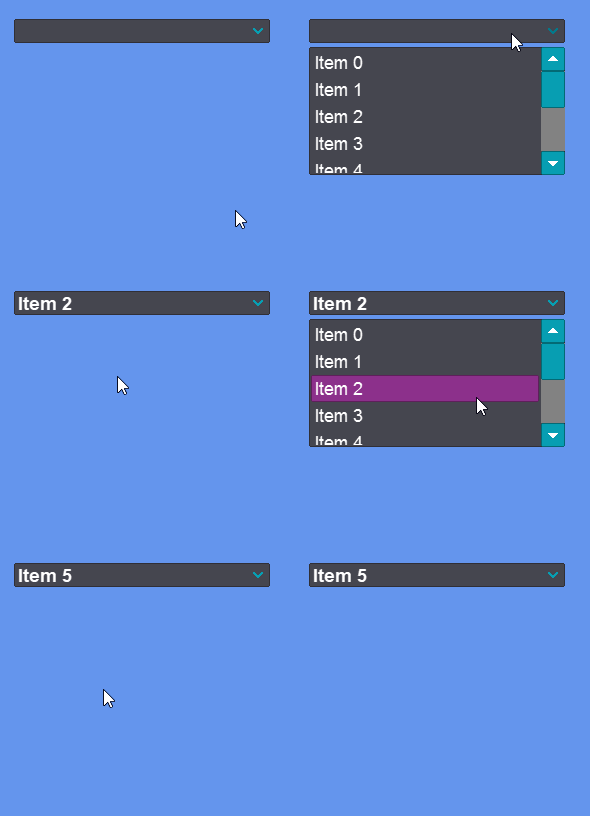
[Try on XnaFiddle.NET](https://xnafiddle.net/#snippet=H4sIAAAAAAAACqvm5VJQUPIsdi_NVbJSKCkqTdUBi2TmZZZkJuZkVqUChZXKEosUkvNzk_Kd8isUbBXyUssVnKFcDU3rmDyYnJ5jSkpIflB-fglYOC2_SCMzr0QhE6jHwBpI2SiYAiltbc2YvOqYPAUggOv0LEnNLQbp11CJUQJxFKoza2OUQMbUIlkQnJqTmlySmuKZl5IKcoqRtRIvVy0An04fSsYAAAA)
## SelectionChanged
The `SelectionChanged` event fires whenever the user picks a different item. The handler receives a `SelectionChangedEventArgs` with information about the previously and newly selected items. You can also read `SelectedObject` or `SelectedIndex` directly inside the handler.
```csharp
// Initialize
var label = new Label();
label.AddToRoot();
var comboBox = new ComboBox();
comboBox.AddToRoot();
comboBox.Y = 24;
for(int i = 0; i < 5; i++)
{
comboBox.Items.Add($"Item {i}");
}
comboBox.SelectionChanged += (sender, args) =>
{
// comboBox.SelectedObject holds the newly selected item
label.Text = $"Selected: {comboBox.SelectedObject}";
};
```
[Try on XnaFiddle.NET](https://xnafiddle.net/#snippet=H4sIAAAAAAAAA3VQTWvDMAz9K8LskEBZQ7ZdEnJYQymFwWDrZZCLU2uNh2OD7WzdQv77bMcNozAfLOlJ7-ljJHuzG3pSWD3ginDJLaeC_yApyCfVIGiLAiqQ-AVP3k_SspEBvX1k7KBelLIB89VH1bdqo86RUMcw5C-5K9oCvzlSfu-Qd6UTLi1wB2SlM82QZXc1PDjfu_lm_tNGjo0E9xaNvcXe-AbJTajJPQAjn-bI95v-tHxFgUfLlaw7Kk_IYBauIDEoGeoVUH0yKVRhgu3Sb72GKw1kz-2Hs9ApwQzYDv0BxDeYmAbuJpnZ8_EOeLZuwTjnRaWA8R_luILfoCTTL8FPcWC3AQAA)
---
# Agent Instructions
This documentation is published with GitBook. GitBook is the documentation platform designed so that both humans and AI agents can read, navigate, and reason over technical content effectively. Learn more at gitbook.com.
## Querying This Documentation
If you need additional information that is not directly available in this page, you can query the documentation by asking a question.
Perform an HTTP GET request on the following URL with the `ask` and `goal` query parameters:
```
GET https://docs.flatredball.com/gum/code/controls/combobox.md?ask=&goal=
```
`ask` is the immediate question: it should be specific, self-contained, and written in natural language.
`goal` is what the user is ultimately trying to achieve, the reason they need the answer. Sharing it helps GitBook give you a better, more relevant answer. A goal is most helpful when it describes the outcome the user wants rather than restating the question. For example, with `ask=how do I create an API token`, a goal like `automate deployments from our CI pipeline` lets GitBook tailor the answer to that use case.
The response will contain a direct answer to the question and relevant excerpts and sources from the documentation.
Use this mechanism when the answer is not explicitly present in the current page, you need clarification or additional context, or you want to retrieve related documentation sections.