> For the complete documentation index, see [llms.txt](https://docs.flatredball.com/gum/llms.txt). Markdown versions of documentation pages are available by appending `.md` to page URLs; this page is available as [Markdown](https://docs.flatredball.com/gum/code/controls/radiobutton.md).
# RadioButton
## Introduction
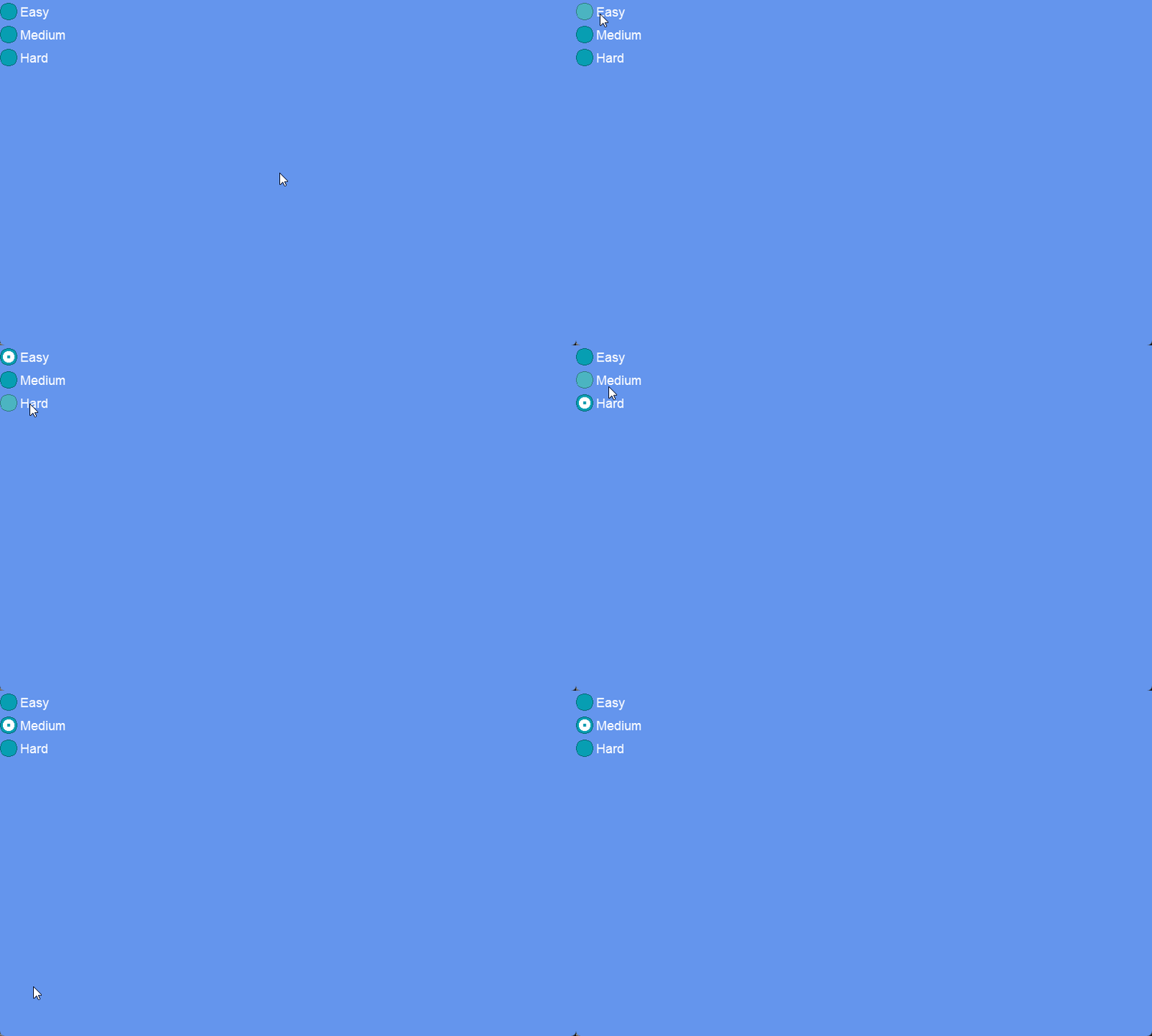
RadioButtons provide a way to display multiple mutually-exclusive options to the user. Clicking on one RadioButton unchecks all other RadioButtons in a group.
## Code Example: Creating RadioButtons
The following code creates RadioButtons for selecting difficulty:
```csharp
// Initialize
var stackPanel = new StackPanel();
stackPanel.AddToRoot();
var easyRadioButton = new RadioButton();
stackPanel.AddChild(easyRadioButton);
easyRadioButton.Text = "Easy";
var mediumRadioButton = new RadioButton();
stackPanel.AddChild(mediumRadioButton);
mediumRadioButton.Text = "Medium";
var hardRadioButton = new RadioButton();
stackPanel.AddChild(hardRadioButton);
hardRadioButton.Text = "Hard";
```
[Try on XnaFiddle.NET](https://xnafiddle.net/#snippet=H4sIAAAAAAAACp2NuwrCMBSG90Lf4ZCpgvQBFAcVUQdBascswQQ82CbQnnjFdzcp0pbUqev3X753HAGwfb21JZsBVVZNG4IaCUWBL-Uwu4kKahLn61FoVcACtLrDqQXJZM51l6dLKXOTGUNNwLWfK1E_MyHRrCyR0b-PHvlzsr5gIZNg6WsBSnP1IPfI2cYFnLXSUkm05TjtYOuLA9ipD03Uk19EJcepg6WvBajT7lzgpCyOPnH0BaJP-5HOAQAA)
## Grouping by Container
RadioButtons automatically group themselves based on their container. If RadioButtons are added directly to a Screen or Component, then they all use the same group and will all be mutually exclusive.
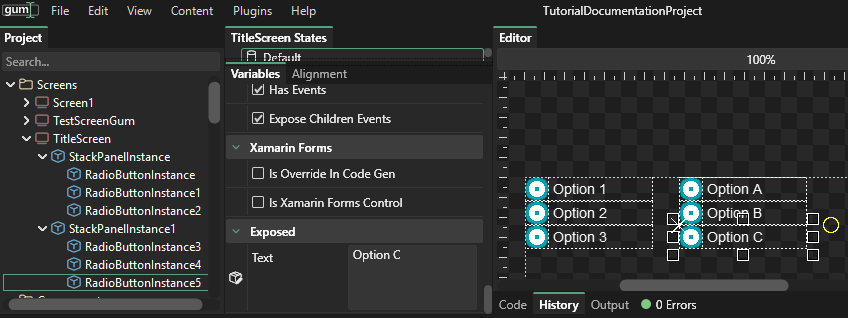
Alternatively, RadioButton instances can be grouped into separate containers (such as StackPanels) to control their grouping. the following example shows two StackPanels, each with three RadioButton instances.
StackPanels grouping RadioButtons
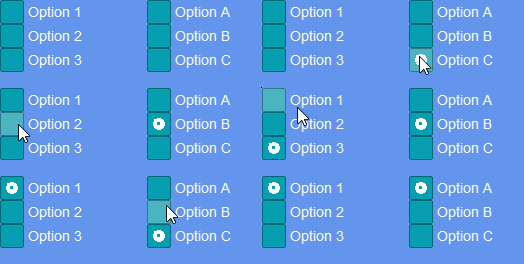
At runtime, the RadioButtons in each StackPanel are mutually exclusive.
Each RadioButton is mutually exclusive with the other RadioButtons in the same column
The following code creates two independent RadioButton groups side by side, one for difficulty and one for game mode. Selecting a RadioButton in one group does not affect the other group.
```csharp
// Initialize
var outerPanel = new StackPanel();
outerPanel.Orientation = Orientation.Horizontal;
outerPanel.Visual.WidthUnits = Gum.DataTypes.DimensionUnitType.RelativeToChildren;
outerPanel.Spacing = 20;
outerPanel.AddToRoot();
var difficultyPanel = new StackPanel();
outerPanel.AddChild(difficultyPanel);
var difficultyLabel = new Label();
difficultyPanel.AddChild(difficultyLabel);
difficultyLabel.Text = "Difficulty:";
var easyRadioButton = new RadioButton();
difficultyPanel.AddChild(easyRadioButton);
easyRadioButton.Text = "Easy";
var mediumRadioButton = new RadioButton();
difficultyPanel.AddChild(mediumRadioButton);
mediumRadioButton.Text = "Medium";
var hardRadioButton = new RadioButton();
difficultyPanel.AddChild(hardRadioButton);
hardRadioButton.Text = "Hard";
var modePanel = new StackPanel();
outerPanel.AddChild(modePanel);
var modeLabel = new Label();
modePanel.AddChild(modeLabel);
modeLabel.Text = "Mode:";
var soloRadioButton = new RadioButton();
modePanel.AddChild(soloRadioButton);
soloRadioButton.Text = "Solo";
var coopRadioButton = new RadioButton();
modePanel.AddChild(coopRadioButton);
coopRadioButton.Text = "Co-op";
var pvpRadioButton = new RadioButton();
modePanel.AddChild(pvpRadioButton);
pvpRadioButton.Text = "PvP";
```
[Try on XnaFiddle.NET](https://xnafiddle.net/#snippet=H4sIAAAAAAAACqWSzU7DMBCE75X6DlFORYIIcSziAC2iSCCqNsAlFxO7dIXjjRIn0CLenbUPieNG_LS3enZmvnXqz-EgCMLb8qbKwnGgi0ocWwUUaGAStoLksGZFgJUWxZwpIYOLQIn3YKlZ-maF0dF5otp59FCAUJppQEVe5xTNsIAt0kl2E09QVkxGz8D1-pHQJeVopWjKNIs3uSijKWRCldRhxkaKFkJSaS1inKxB8kKobucyZymoV2o6O-1OLjmPcYGo7eKJMtfjsFpBWkm9-dsdqcNiR16wr_GOvTSN9rct84J9jdbc9VopisWHpsIknDaDcRI2aMHKzYJxwKtKa_snGLSj_LyAFzdeT2oXuKaBQ84Ehyo7gL1TYNw7Ysu_tyNngzUr-AF8L268ntSyZzRw745c_PPxNJH22Rip_8E05m6-eSTNwfk6JLkPo0SJv3-cHpAXNC5PaqFLGjjMFDHfi-kFjcuTWuYETzB3oHm9H7ObM6au0hLn9Zx44XDw9Q1Cki1wRAUAAA)
## Checked and Unchecked Events
`RadioButton` inherits `Checked` and `Unchecked` events from `ToggleButton`. `Checked` fires when a RadioButton becomes selected; `Unchecked` fires when it is deselected because another RadioButton in the same group was chosen.
```csharp
// Initialize
var stackPanel = new StackPanel();
stackPanel.AddToRoot();
var easyRadioButton = new RadioButton();
stackPanel.AddChild(easyRadioButton);
easyRadioButton.Text = "Easy";
var hardRadioButton = new RadioButton();
stackPanel.AddChild(hardRadioButton);
hardRadioButton.Text = "Hard";
var label = new Label();
stackPanel.AddChild(label);
easyRadioButton.Checked += (sender, _) =>
{
label.Text = "Easy selected";
};
hardRadioButton.Checked += (sender, _) =>
{
label.Text = "Hard selected";
};
```
[Try on XnaFiddle.NET](https://xnafiddle.net/#snippet=H4sIAAAAAAAAA6WQzQrCMBCEX2XJqQUpUm9KDypFBQ-iHgsSm4UGYwJN6i--u01brK31ojktM7vzZfdOFnqWHcnQpBn2CJfccCr4DcmQnGgK2tD4sKISBQQg8Qybl-C4o0jWvjdmbKvWSpnCsMNI9XVNGVeTzBglq4Q3pSNimnDBnNakbWtJ3hYvJk-Msn7f98PcLKsKndCU_YZuTdq2ltREz3OzgRZ0_7rW0tZfUUVn127TBOMDspIwCcDRKBmmPdi5EFhxEEbyHknIXxHyeQ3QKDA2WP_t0bHJnyC7exeIPJ5Cn-U6WAIAAA)
## Reading IsChecked
To determine which RadioButton is selected at any point, check the `IsChecked` property on each instance. `IsChecked` is `true` for the selected button and `false` for all others in the group.
```csharp
// Initialize
var stackPanel = new StackPanel();
stackPanel.AddToRoot();
var easyRadioButton = new RadioButton();
stackPanel.AddChild(easyRadioButton);
easyRadioButton.Text = "Easy";
var hardRadioButton = new RadioButton();
stackPanel.AddChild(hardRadioButton);
hardRadioButton.Text = "Hard";
var label = new Label();
stackPanel.AddChild(label);
var button = new Button();
stackPanel.AddChild(button);
button.Text = "Check selection";
button.Click += (_, _) =>
{
if(easyRadioButton.IsChecked == true)
label.Text = "Easy is selected";
else if(hardRadioButton.IsChecked == true)
label.Text = "Hard is selected";
else
label.Text = "Nothing selected";
};
```
[Try on XnaFiddle.NET](https://xnafiddle.net/#snippet=H4sIAAAAAAAAA51SXWvCMBT9K5c8tSBF3JuSh1lkE8YYzseCpM3dejFLoEn3Jf73NbWrGp1jy1Ny7zn3nJxkw-b2pn5hY1fVOGCkyZFQ9IlszF5FBdaJYv0gNCrgoPENHvtCFE8yve8n11IuzcIY1zY8GYX9WAhJZlo7Z3Q34aByZkRakpJRwPSwoJQs8d01E7N6OByNZk1zt-ukS1HJ_0kHTA8LSsfSt03zSFqJvE_rzu9_lGqR32Hlh0Z_8Zj31vIzjtISizVYVFg4Mro312FTRU27rU45RKsBrGLg_nw1y_Qm09AsegrfIJnbdjBK4Bz8d4l3UL_am5w-CZDtfOA-I49HZdFrhMn-UcNnf1HjIvveuJL08yl7O2HbL25P9ikZAwAA)
## Label Wrapping
Label wrapping behavior can be controlled by modifying the visual width and the internal label width values. The following code shows how to create two RadioButtons - one wraps its text and one has the text extend to the right.
```csharp
// Initialize
var stackPanel = new StackPanel();
stackPanel.AddToRoot();
var noWrapRadio = new RadioButton();
stackPanel.AddChild(noWrapRadio);
noWrapRadio.Text = "This radio button will not line wrap - it goes on forever";
var noWrapVisual = (Gum.Forms.DefaultVisuals.V3.RadioButtonVisual)noWrapRadio.Visual;
noWrapVisual.WidthUnits = Gum.DataTypes.DimensionUnitType.RelativeToChildren;
noWrapVisual.Width = 0;
noWrapVisual.TextInstance.WidthUnits = Gum.DataTypes.DimensionUnitType.RelativeToChildren;
noWrapVisual.TextInstance.Width = 0;
var yesWrapRadio = new RadioButton();
stackPanel.AddChild(yesWrapRadio);
yesWrapRadio.Text = "This radio button does line wrap if text is long enough";
var yesWrapVisual = (Gum.Forms.DefaultVisuals.V3.RadioButtonVisual)yesWrapRadio.Visual;
yesWrapVisual.HeightUnits = Gum.DataTypes.DimensionUnitType.RelativeToChildren;
yesWrapVisual.Height = 0;
```
[Try on XnaFiddle.NET](https://xnafiddle.net/#snippet=H4sIAAAAAAAAA61RwU7CQBD9lUlPkOiG4A3jQSUqN1MrXLisdGgnLrtkdxZE47-72xJotYkJeuvOm_fm9b2PZOLu_SoZsfV4lpAmJqnoHZNRspEWHMvF66PUqOAKNG7h6TDo9S_n-oiL6zzPTGoMV0AkazOzcp3KnMyeXX3feGajO-i3Jam812DFlcZTZPjGQWnuB4PhMCvJga3EXypF2JJS4SiDIo2wDTQ4B2IoDDoI-NJY3KCt6S2PU3Jexl_shTDEnbErJ8a4lF5xDTkxvRAN9_W03zRXjw6O66eYUc7lc4jVBfUoPpYss90awwFaoXZkdITjSKSoJNMGM1NFYVF3ygWlwXcgRjOJeeoF_vfRn9p7BzHAHbpTWm7S4k7z_VvPeezz2DEtgSMhrCmjC0BtfFG2Wt6rn1pzy9yh55aoeEAqSv5T6F2CVdLJ5xeoq02GqAMAAA)
---
# Agent Instructions
This documentation is published with GitBook. GitBook is the documentation platform designed so that both humans and AI agents can read, navigate, and reason over technical content effectively. Learn more at gitbook.com.
## Querying This Documentation
If you need additional information that is not directly available in this page, you can query the documentation by asking a question.
Perform an HTTP GET request on the following URL with the `ask` and `goal` query parameters:
```
GET https://docs.flatredball.com/gum/code/controls/radiobutton.md?ask=&goal=
```
`ask` is the immediate question: it should be specific, self-contained, and written in natural language.
`goal` is what the user is ultimately trying to achieve, the reason they need the answer. Sharing it helps GitBook give you a better, more relevant answer. A goal is most helpful when it describes the outcome the user wants rather than restating the question. For example, with `ask=how do I create an API token`, a goal like `automate deployments from our CI pipeline` lets GitBook tailor the answer to that use case.
The response will contain a direct answer to the question and relevant excerpts and sources from the documentation.
Use this mechanism when the answer is not explicitly present in the current page, you need clarification or additional context, or you want to retrieve related documentation sections.