> For the complete documentation index, see [llms.txt](https://docs.flatredball.com/gum/llms.txt). Markdown versions of documentation pages are available by appending `.md` to page URLs; this page is available as [Markdown](https://docs.flatredball.com/gum/code/files-and-fonts/content-using-embedded-resources.md).
# Content Using Embedded Resources
## Introduction
While some platforms (such as Windows) provide direct access to the file system, access to files on platforms like iOS and Android is limited.
Content loading can be performed using embedded resources to standardize file access across all platforms. This section discusses how to use embedded resources in SkiaGum.
## Embedded Resource Setup
Before loading a resource, SkiaGum projects must first be set up to load from embedded resource. Gum must know two pieces of information before content can be loaded:
1. Which project contains the embedded resources to be loaded
2. How to modify a resource path (optional, but required if using generated code)
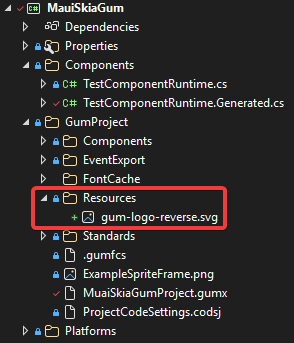
Before performing this initialization, you must decide where you will store your content. For example, consider a project which stores all of its SVG files in a `GumProject/Resources` folder.
Resources folder in a GumProject folder
{% hint style="info" %}
If you are using a Gum (.gumj) project, adding resource files relative to the Gum project is recommended since it keeps your project portable.
{% endhint %}
When using generated code, Gum generates all file loads relative to the .gumj location, so we need to tell the Gum runtime to use this as its relative path.
To do this, add the following code to where you initialize your code project, such as the CreateMauiApp function:
```csharp
// Initialize
RenderingLibrary.Content.ContentLoader.CustomResourceAssembly = typeof(MauiProgram).Assembly;
RenderingLibrary.Content.ContentLoader.AdjustContentName = (contentName) =>
{
return "MauiSkiaGum.GumProject." + contentName;
};
```
{% hint style="info" %}
`ContentLoader` is available in November 2026, or now if building Gum from source. Earlier releases use `SkiaResourceManager` for the same two settings, and it still compiles with a warning in November. See [Migrating to 2026 November](/gum/gum-tool/upgrading/migrating-to-2026-november.md#skiaresourcemanager-and-embeddedresourcecontentloader-are-obsolete).
{% endhint %}
Notice that resource loading uses the period separator for paths, so the adjusted content name should take form of `YourProjectName.Subfolder.Subfolder2.AdditionalSubFolder`.
## Marking Files as Embedded Resource
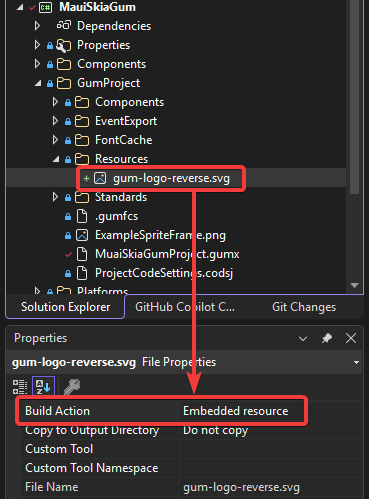
To mark your files as embedded resource in Visual Studio:
1. Right-click on a file and select Properties
2. Change the `Build Action` to `Embedded resource` in the Properties tab.
For simpler maintenace, this can be changed to a wildcard in the .csproj file:
```xml
```
## Generated Code Content Loading
If embedded resource content loading is set up correctly, then generated code will correctly load files.
Note that generated code does not assume embedded resource content loading. For example, the following block of generated code shows how an SVG SourceFile is assigned:
```csharp
this.SvgInstance.SourceFile = @"Resources\gum-logo-reverse.svg";
```
Notice that in this case the source file uses a slash separator, but embedded resources internally use a period character for separators. Internally Gum automatically handles this difference so no changes are needed in generated code.
---
# Agent Instructions
This documentation is published with GitBook. GitBook is the documentation platform designed so that both humans and AI agents can read, navigate, and reason over technical content effectively. Learn more at gitbook.com.
## Querying This Documentation
If you need additional information that is not directly available in this page, you can query the documentation by asking a question.
Perform an HTTP GET request on the following URL with the `ask` and `goal` query parameters:
```
GET https://docs.flatredball.com/gum/code/files-and-fonts/content-using-embedded-resources.md?ask=&goal=
```
`ask` is the immediate question: it should be specific, self-contained, and written in natural language.
`goal` is what the user is ultimately trying to achieve, the reason they need the answer. Sharing it helps GitBook give you a better, more relevant answer. A goal is most helpful when it describes the outcome the user wants rather than restating the question. For example, with `ask=how do I create an API token`, a goal like `automate deployments from our CI pipeline` lets GitBook tailor the answer to that use case.
The response will contain a direct answer to the question and relevant excerpts and sources from the documentation.
Use this mechanism when the answer is not explicitly present in the current page, you need clarification or additional context, or you want to retrieve related documentation sections.