> For the complete documentation index, see [llms.txt](https://docs.flatredball.com/gum/llms.txt). Markdown versions of documentation pages are available by appending `.md` to page URLs; this page is available as [Markdown](https://docs.flatredball.com/gum/code/files-and-fonts/file-loading.md).
# File Loading
### Introduction
A typical Gum project references many file types. Aside from the files created by the Gum tool (such as a .gumj file), a Gum project also references .png files and .fnt files.
Files referenced by your Gum project (as created in the Gum UI tool) automatically load their necessary dependencies assuming the files are part of the built file system. Usually your project game project should copy all Gum XML, PNG, and FNT files to the output folder. Gum does not use the MonoGame content pipeline.
### Files in Gum Projects
When a file is added to a Gum project, the Gum UI tool checks the location of the file. If the file is not relative to the Gum project file (.gumj), the Gum UI tool warns you about the file being located outside of the project's folder. The tool recommends that the file should be copied so that your project remains portable.
If all of your project files are located relative to the .gumj root project file, then your project should be portable, and all referenced files will be automatically resolved for you when instantiating Screens and Components from your Gum project.
The Gum runtime library performs all of its loading from-file, so all of your files must be present in the destination directory. As explained in the [Loading a Gum Project (.gumj/.gumx)](/gum/code/getting-started/setup/loading-a-gum-project-.gumx.md) page, all of your files should be set to **Copy if newer** in Visual Studio.
bear.png file set to Copy if newer
### Loading Files Through Runtime Objects
Gum runtime objects can reference files. For example both SpriteRuntime and NineSliceRuntime can reference a Texture2D. Similarly, the TextRuntime type can reference BitmapFonts which are loaded from .fnt and .png files.
All runtime types support the assignment of these files by direct assignment of their appropriate type, or by string name.
For example, a Sprite's texture could be assigned either through the SourceFileName property or the Texture property:
```csharp
// Initialize
SpriteRuntimeInstance.SourceFile = "bear.png";
// or
SpriteRuntimeInstance.Texture = MyTexture;
```
In the case of the SourceFile assignment, the SpriteRuntime loads the Texture2D from disk. By default the file is loaded relative to the Content folder.
### Setting FileManager.RelativeDirectory
Whenever a file is assigned on a runtime object, Gum looks for the file in the `ToolsUtilities.FileManager.RelativeDirectory` directory. This directory defaults to your game's Content folder.
If you call `GumService.Default.Initialize` and pass a .gumj file, then RelativeDirectory is set to the directory containing the Gum project.
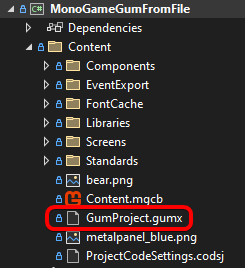
If your Gum project (.gumj) is located in the Content folder, RelativeDirectory is set to "Content/".
GumProject.gumj located in the Content folder
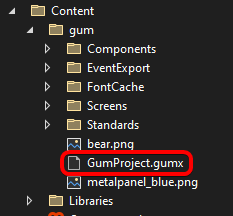
If your project is located in a subfolder of Content, then RelativeDirectory is set to the folder containing the Gum project. In this case, RelativeDirectory would be set to "Content/gum/"
Gum project in a subfolder
RelativeDirectory is used whenever files are loaded. These operations include:
* Calling ToGraphicalUiElement
* Assigning SourceFileName
* Setting custom or cached fonts on a Text object
* Setting states (which may assign variables)
It's recommended practice to set the RelativeDirectory to your Gum project's location and to leave it there so you never have to consider subfolders in any code that accesses files directly or indirectly.
### Loading from a `.gumpkg` Bundle
In addition to loose files, Gum can load a project from a single-file `.gumpkg` bundle produced by [`gumcli pack`](/gum/cli/cli/pack.md). The path you hand to `GumService.Initialize` decides which one you get:
* A path ending in `.gumj` (or `.gumx`) loads loose files. This is the dev-time path, and hot reload works in this mode.
* A path ending in `.gumpkg` reads element XML, textures, and fonts from inside the bundle via `FileManager.CustomGetStreamFromFile`. No loose copy is needed in the output directory. MonoGame, KNI, FNA, and raylib load bundles; SkiaGum and Silk.NET read loose files only.
"Fonts" here covers both kinds: the baked `FontCache` `.fnt` and `.png` pages, and a `.ttf` the project rasterizes at runtime.
This means a published build can ship a single `.gumpkg` next to the executable instead of a folder tree of `.gusx`/`.gucx`/`.png`/`.fnt` files. See the [pack](/gum/cli/cli/pack.md) page for the producer side and the runtime contract.
### Serving Files From Your Own Source
`FileManager.CustomGetStreamFromFile` holds a function that takes a file path and returns a `Stream`. When you assign one, Gum reads through it instead of reading the filesystem. This is the same property the `.gumpkg` loader uses, and your game can assign its own. It covers every file Gum loads, `.ttf` files included, so a game that keeps its assets in a zip, an embedded resource store, or a download cache can run with no loose files on disk.
`CustomGetStreamFromFile` sits below the `IContentLoader` described further down. `IContentLoader` returns a finished object, such as a `Texture2D`. `CustomGetStreamFromFile` returns raw bytes and leaves Gum to parse them as it normally would.
{% hint style="info" %}
**Shipping September 2026:** `.ttf` files reading through this function ships in the September release, or now if building Gum from source. Before this, Gum read a `.ttf` straight off the filesystem while every other kind of file went through the function.
{% endhint %}
### File Caching
By default Gum caches loaded textures. In other words, the following code only results in a single file IO operation:
```csharp
// Initialize
Sprite1.SourceFile = "MyFile.png";
Sprite2.SourceFile = "MyFile.png";
```
File caching can be disabled by setting the LoaderManager's CacheTextures property to false as shown in the following code:
```csharp
// Initialize
LoaderManager.Self.CacheTextures = false;
```
Of course, doing so means that Gum will go to disk for every file which can increase load times and result in significantly more video memory usage.
Note that setting CacheTextures to false flushes the cache and disposes all cached content, so you can force the reload of all files by calling setting CacheTextures to false, then back to true as shown in the following code:
```csharp
// Initialize
Sprite1.SourceFile = "MyFile.png"; // This loads the file from disk
Sprite2.SourceFile = "MyFile.png"; // This uses the cached Texture2D
LoaderManager.Self.CacheTextures = false; // This clears the cache:
LoaderManager.Self.CacheTextures = true;
Sprite1.SourceFile = "MyFile.png"; // This once-again goes to disk to load the file
Sprite2.SourceFile = "MyFile.png"; // This uses the cached Texture2D
LoaderManager.Self.CacheTextures = false; // This clears the cache
Sprite1.SourceFile = "MyFile.png"; // This once-again goes to disk to load the file
Sprite2.SourceFile = "MyFile.png"; // This also goes to disk to load the file
```
Be careful setting CacheTextures to false since all existing textures will be disposed. This means that if you have loaded textures which are still being referenced by runtime objects, you will get an exception if those are still being drawn after setting CacheTextures to false.
### Customizing How Content Loads
By default Gum resolves a `SourceFile` name to a texture by reading a file from disk (relative to `FileManager.RelativeDirectory`). You can replace this behavior with your own logic. For example, you can load assets from a custom store, or hand back a texture your game engine has *already* loaded so the same image does not occupy video memory twice.
Gum performs all of its loading through an `IContentLoader`, which has two methods:
```csharp
// Class scope
public interface IContentLoader
{
T LoadContent(string contentName);
T TryLoadContent(string contentName);
}
```
The active loader is held by `LoaderManager.Self.ContentLoader`. Each runtime (MonoGame, Raylib, and so on) installs a default loader during initialization. To customize loading, assign your own implementation to that property. **This is the same property and the same `IContentLoader` interface on every backend**, so the approach is identical across MonoGame, KNI, FNA, and Raylib.
#### Wrapping the Built-in Loader
The cleanest approach is to *wrap* the built-in loader: intercept only the content names you care about, and forward everything else to the default loader. This keeps Gum's normal file loading, and its texture caching, working for all the assets you do not handle yourself.
Wrapping is the only way to build on the built-in loader. Each backend's built-in loader is `sealed`, and none of its methods are virtual, so you implement `IContentLoader` yourself and hold the built-in loader as a field rather than inheriting from it.
```csharp
// Class scope
public class CustomContentLoader : RenderingLibrary.Content.IContentLoader
{
RenderingLibrary.Content.IContentLoader _defaultLoader;
public CustomContentLoader(RenderingLibrary.Content.IContentLoader defaultLoader)
{
_defaultLoader = defaultLoader;
}
public T LoadContent(string contentName)
{
// typeof(T) is the standard way to branch in an IContentLoader.
if (typeof(T) == typeof(Texture2D) &&
MyAssetSource.TryGetTexture(contentName, out Texture2D texture))
{
return (T)(object)texture;
}
// Forward everything else so default loading and caching still apply.
return _defaultLoader.LoadContent(contentName);
}
public T TryLoadContent(string contentName)
{
if (typeof(T) == typeof(Texture2D) &&
MyAssetSource.TryGetTexture(contentName, out Texture2D texture))
{
return (T)(object)texture;
}
return _defaultLoader.TryLoadContent(contentName);
}
}
```
`LoaderManager.Self.ContentLoader` already holds your backend's default loader, which Gum installs during `GumService.Default.Initialize`. Read that property and pass it to your own loader, then assign your loader back to the same property. Do this after `Initialize` and before any content loads. If you install earlier, `ContentLoader` is still `null` and your wrapper has nothing to fall back to.
```csharp
// Initialize
var loaderManager = RenderingLibrary.Content.LoaderManager.Self;
loaderManager.ContentLoader = new CustomContentLoader(loaderManager.ContentLoader);
```
{% hint style="warning" %}
Texture caching lives inside the content loader, not above it. A custom `IContentLoader` that does **not** delegate to the built-in loader bypasses Gum's cache (`LoaderManager.CacheTextures`) entirely, so every load goes straight to your code. Wrapping the built-in loader, as shown above, preserves caching for the names you forward. If your custom source already manages its own assets, that is usually fine, and you simply do not need Gum's cache for those.
{% endhint %}
#### What Your Loader Receives
Gum resolves a relative content name against `FileManager.RelativeDirectory` before it calls your loader, so a `SourceFile` of `atlas.png` arrives as a full path such as `C:/MyGame/Content/atlas.png`. A test like `contentName == "atlas.png"` never matches. Compare with `EndsWith` or `Contains` instead.
Gum also does not check whether the name refers to a real file before calling your loader, so a content name can stand for something that is not a file at all. You are free to invent a name such as `cart://atlas.png` for content your loader resolves on its own. Gum prefixes an invented name the same way it prefixes any other relative name, which is a second reason to match on part of the name rather than all of it.
#### Sharing a Texture Your Game Already Loaded
A game that draws its own sprites usually holds textures the UI needs too, such as a shared atlas containing item icons and character portraits. Your loader can return one of those textures directly, so the atlas occupies video memory once instead of twice. `Texture2D` below is your backend's texture type, so it comes from MonoGame on MonoGame and from `Raylib_cs` on Raylib.
```csharp
// Class scope
public class AtlasContentLoader : RenderingLibrary.Content.IContentLoader
{
RenderingLibrary.Content.IContentLoader _defaultLoader;
public AtlasContentLoader(RenderingLibrary.Content.IContentLoader defaultLoader)
{
_defaultLoader = defaultLoader;
}
public T LoadContent(string contentName)
{
// typeof(T) is the standard way to branch in an IContentLoader.
if (typeof(T) == typeof(Texture2D) && contentName.EndsWith("atlas.png"))
{
return (T)(object)MyRenderer.SharedAtlas;
}
return _defaultLoader.LoadContent(contentName);
}
public T TryLoadContent(string contentName)
{
if (typeof(T) == typeof(Texture2D) && contentName.EndsWith("atlas.png"))
{
return (T)(object)MyRenderer.SharedAtlas;
}
return _defaultLoader.TryLoadContent(contentName);
}
}
```
Install it the same way as any other wrapper, handing it the loader Gum already has:
```csharp
// Initialize
var loaderManager = RenderingLibrary.Content.LoaderManager.Self;
loaderManager.ContentLoader = new AtlasContentLoader(loaderManager.ContentLoader);
```
Gum never disposes a texture you return this way, because the texture never enters Gum's cache. Your game keeps ownership of the atlas and decides when to unload it.
Every sprite drawn from the atlas shares one texture, so set each sprite's texture coordinates to pick its own frame out of that texture. See [TextureAddress](/gum/code/standard-visuals/spriteruntime/textureaddress.md).
{% hint style="warning" %}
Do not put a texture your game owns into Gum's cache with `LoaderManager.AddDisposable`. Gum disposes everything in that cache when you set `CacheTextures` to `false` or call `DisposeAndClear`, which unloads a texture your game is still drawing. Returning the texture from a loader keeps ownership with your game.
{% endhint %}
#### Loading Through the MonoGame Content Pipeline
On the XNA-family backends (MonoGame/KNI/FNA), the built-in `ContentLoader` also exposes an `XnaContentManager` property. When set, files referenced without an extension are loaded as content-pipeline (`.xnb`) assets through that `ContentManager`. This is an XNA-only convenience; there is no equivalent on Raylib, which has no content pipeline.
---
# Agent Instructions
This documentation is published with GitBook. GitBook is the documentation platform designed so that both humans and AI agents can read, navigate, and reason over technical content effectively. Learn more at gitbook.com.
## Querying This Documentation
If you need additional information that is not directly available in this page, you can query the documentation by asking a question.
Perform an HTTP GET request on the following URL with the `ask` and `goal` query parameters:
```
GET https://docs.flatredball.com/gum/code/files-and-fonts/file-loading.md?ask=&goal=
```
`ask` is the immediate question: it should be specific, self-contained, and written in natural language.
`goal` is what the user is ultimately trying to achieve, the reason they need the answer. Sharing it helps GitBook give you a better, more relevant answer. A goal is most helpful when it describes the outcome the user wants rather than restating the question. For example, with `ask=how do I create an API token`, a goal like `automate deployments from our CI pipeline` lets GitBook tailor the answer to that use case.
The response will contain a direct answer to the question and relevant excerpts and sources from the documentation.
Use this mechanism when the answer is not explicitly present in the current page, you need clarification or additional context, or you want to retrieve related documentation sections.
%20(1)%20(1)%20(1)%20(1)%20(1)%20(1)%20(1).png?alt=media)