> For the complete documentation index, see [llms.txt](https://docs.flatredball.com/gum/llms.txt). Markdown versions of documentation pages are available by appending `.md` to page URLs; this page is available as [Markdown](https://docs.flatredball.com/gum/code/files-and-fonts/fonts/font-cache.md).
# Font Cache
## Introduction
The **Font Cache** is a folder of pre-generated `.fnt` files (and their corresponding `.png` atlas pages) that Gum loads at runtime when dynamic generation isn't in use. The Gum tool generates these files automatically as you edit your project; you can also create them manually or with third-party tools.
For when to use this strategy vs dynamic generation, see the decision tree on the [Fonts](/gum/code/files-and-fonts/fonts.md) page. The FontCache is also the only available strategy today for runtimes that don't yet have dynamic generation (Sokol).
## How It Works
If `UseCustomFont` is `false` (the default) and no `InMemoryFontCreator` is registered, a `TextRuntime`'s font is determined by its font property values. Those values combine into a file name, and the corresponding `.fnt` file must already exist in a `FontCache` folder under your content directory.
The properties that participate are:
* `Font` (or `FontFamily`)
* `FontSize`
* `OutlineThickness`
* `UseFontSmoothing`
* `IsItalic`
* `IsBold`
## Naming Convention
The generated file name follows the pattern `FontCache/Font{FontSize}{Font}.fnt`, where spaces in the font name are replaced with underscores. Optional suffixes are appended **in this order** when their conditions are met:
* `OutlineThickness` — if greater than 0, then `_o` followed by the value is added. For example, `FontCache/Font24Arial_o3.fnt`.
* `UseFontSmoothing` — if `false`, then `_noSmooth` is appended. For example, `FontCache/Font24Arial_noSmooth.fnt`.
* `IsItalic` — if `true`, then `_Italic` is appended. For example, `FontCache/Font24Arial_Italic.fnt`.
* `IsBold` — if `true`, then `_Bold` is appended. For example, `FontCache/Font24Arial_Bold.fnt`.
A font loaded from a font file, such as `Fonts/Icons.ttf`, uses the file's name and adds `_ttf` before the other suffixes. For example, `FontCache/Font24Icons_ttf.fnt`.
Projects at [Version 6](/gum/gum-tool/upgrading/upgrading-file-gumx-version.md#version-6) or later also add a short code made from the file's path, so two font files with the same name in different folders get separate files. For example, `FontCache/Font24Icons_ttf_3fa91c2b.fnt`. The code comes from the path exactly as the `Font` value is written, with `/` and `\` treated the same. Projects below Version 6, and code that runs without a loaded project, keep the name without the code.
For example:
```csharp
// Initialize
text.UseCustomFont = false;
text.Font = "Arial";
text.FontSize = 24;
```
The runtime searches for `FontCache/Font24Arial.fnt` relative to the content directory.
The `BmfcSave.GetFontCacheFileNameFor` method computes the expected file name for any combination of values:
```csharp
// Initialize
var desiredFntName = BmfcSave.GetFontCacheFileNameFor(
18, // font size
"Consolas", // font name
2, // outline thickness
useFontSmoothing: true,
isItalic: false,
isBold: true);
```
This method does not take the content folder into account; it just returns the file name.
## Creating Font Cache Files
You have three options for getting `.fnt` files into your FontCache:
1. **Let the Gum tool do it.** Open Gum, edit a `Text` instance with the desired properties, and the tool generates the corresponding `.fnt` file automatically. This is the typical workflow.
2. **Use Angelcode Bitmap Font Generator.** For more information see the [Use Custom Font](/gum/gum-tool/gum-elements/text/use-custom-font.md) page.
3. **Write the `.fnt` by hand.** Requires understanding the `.fnt` file format; the easiest way to learn it is to open an existing file the tool produced.
Using the Gum tool is the simplest path, but you must know which fonts and sizes your game will use ahead of time. A font is created automatically whenever a `Text` property is changed.
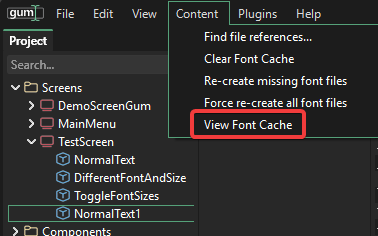
To view the existing font cache, click the **View Font Cache** menu item in Gum.
View Font Cache menu item
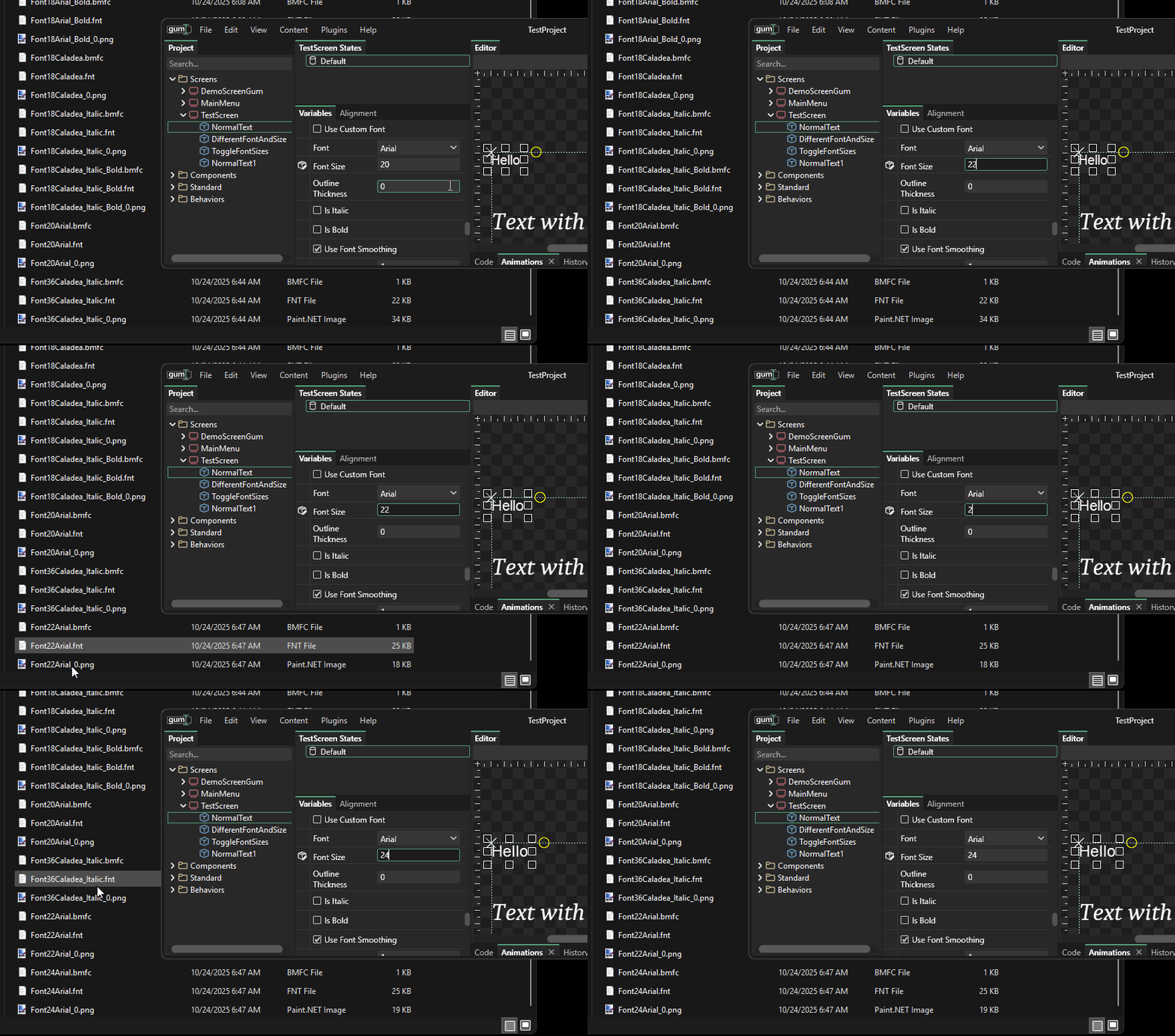
As you change a Text object's properties, new files are added to the FontCache folder:
Changing the Font Size creates new fonts in FontCache
## Loading From Disk
`.fnt` files (and their referenced `.png` atlas pages) are loaded **from disk**, not through the MonoGame content pipeline. This has two consequences:
* File extensions are part of the path (`Font24Arial.fnt`, not `Font24Arial`).
* Every `.fnt` and `.png` file in the FontCache must have its **Copy to Output Directory** value set to **Copy if newer** (or the equivalent for your platform).
The easiest way to handle this is a wildcard `` item in your `.csproj` — see [Loading a Gum Project (.gumj/.gumx)](/gum/code/getting-started/setup/loading-a-gum-project-.gumx.md#adding-the-gum-project-to-your-csproj).
## Known Limitations
* **No opt-out.** Even if your shipped game uses only KernSmith, the Gum tool still generates `.fnt` files in `FontCache/` while you edit. This is harmless if you don't ship the files but it adds clutter. Opt-out is planned ([#2695](https://github.com/vchelaru/Gum/issues/2695)).
* **Single union charset.** The FontCache contains one `.fnt` per `(font, size, style)` combination, covering every glyph used anywhere in the project. Per-locale subdirectories are planned ([#2695](https://github.com/vchelaru/Gum/issues/2695)); see [Font Localization](/gum/code/files-and-fonts/fonts/font-localization.md) for the current state.
## Related Pages
* [Font Strategies](/gum/code/files-and-fonts/fonts/font-strategies.md) — full strategy comparison including the FontCache strategy.
* [Font Localization](/gum/code/files-and-fonts/fonts/font-localization.md) — how locale will eventually slot into the cache layout.
* [BitmapFont](/gum/code/files-and-fonts/bitmapfont.md) — the runtime type that ends up loaded from each `.fnt`.
---
# Agent Instructions
This documentation is published with GitBook. GitBook is the documentation platform designed so that both humans and AI agents can read, navigate, and reason over technical content effectively. Learn more at gitbook.com.
## Querying This Documentation
If you need additional information that is not directly available in this page, you can query the documentation by asking a question.
Perform an HTTP GET request on the following URL with the `ask` and `goal` query parameters:
```
GET https://docs.flatredball.com/gum/code/files-and-fonts/fonts/font-cache.md?ask=&goal=
```
`ask` is the immediate question: it should be specific, self-contained, and written in natural language.
`goal` is what the user is ultimately trying to achieve, the reason they need the answer. Sharing it helps GitBook give you a better, more relevant answer. A goal is most helpful when it describes the outcome the user wants rather than restating the question. For example, with `ask=how do I create an API token`, a goal like `automate deployments from our CI pipeline` lets GitBook tailor the answer to that use case.
The response will contain a direct answer to the question and relevant excerpts and sources from the documentation.
Use this mechanism when the answer is not explicitly present in the current page, you need clarification or additional context, or you want to retrieve related documentation sections.