> For the complete documentation index, see [llms.txt](https://docs.flatredball.com/gum/llms.txt). Markdown versions of documentation pages are available by appending `.md` to page URLs; this page is available as [Markdown](https://docs.flatredball.com/gum/code/gum-tool-code-contributing-and-plugins/variablesave.md).
# VariableSave
A VariableSave represents a single variable on an object, such as its X or Y value.
VariableSaves can be of any type, can contain any value, and can hold values either on the Component itself or on a contained instance.
### Variables, Instances, and Gum Elements
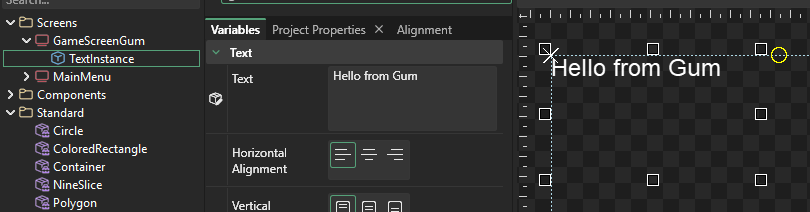
By default an instance does not own its variables. Rather, variables exist inside of states which can affect the instance. For example, consider the following image:
TextInstance displaying the text "Hello from Gum"
In this case, the GameScreenGum is the owner of the variable, not TextInstance. The GameScreenGum has the following:
* GameScreenGum (ScreenSave)
* Default State (StateSave)
* Variables (List\)
* TextInstance.Text = "Hello from Gum" (VariableSave)
This relationship may seem complicated, but it is requires because the Screen can create multiple StateSaves (including StateSaves inside of other StateCategorySaves). The actual value of the variable depends on which StateSave is being considered.
Furthermore, the effective value of a variable (such as "Hello from Gum") can be the result of variables being assgined at multiple levels.
For example, consider that the TextInstance in the example above is setting its text to "Hello from Gum" at the ScreenSave level. This value **overrides** the Text value which is assigned on the standard Text object.
The following lists the levels where variables can be assigned:
* Base standard (such as on the Text under the Standard folder)
* On an instance in a component (such as a Text instance in a Button component)
* On an instance of a component through an exposed variable (such as a Button instance setting its text to "Quit" in a GameScreen)
* In a derived class (such as a derived ExitButton which inherits from Button, but sets the TextInstance.Text to "Exit")
* In a categorized state (such as a DarkMode state changing the color of a Button's background)
The hierarchy of which variables take precedence over other variables can be complicated which is why Gum provides a way to get the effective value for a variable.
The GetValueRecursively method provides a way to get the effective value for an object given a state. For example:
```csharp
var state = GameScreenGum.DefaultState;
var text = (string)DefaultState.GetValueRecursively("TextInstance.Text");
```
---
# Agent Instructions
This documentation is published with GitBook. GitBook is the documentation platform designed so that both humans and AI agents can read, navigate, and reason over technical content effectively. Learn more at gitbook.com.
## Querying This Documentation
If you need additional information that is not directly available in this page, you can query the documentation dynamically by asking a question.
Perform an HTTP GET request on the current page URL with the `ask` query parameter, and the optional `goal` query parameter:
```
GET https://docs.flatredball.com/gum/code/gum-tool-code-contributing-and-plugins/variablesave.md?ask=&goal=
```
`ask` is the immediate question: it should be specific, self-contained, and written in natural language.
`goal` is optional and describes the broader end goal you are ultimately trying to accomplish on behalf of the user. GitBook uses it to tailor the answer towards what is most useful for that goal.
The response will contain a direct answer to the question and relevant excerpts and sources from the documentation.
Use this mechanism when the answer is not explicitly present in the current page, you need clarification or additional context, or you want to retrieve related documentation sections.