> For the complete documentation index, see [llms.txt](https://docs.flatredball.com/gum/llms.txt). Markdown versions of documentation pages are available by appending `.md` to page URLs; this page is available as [Markdown](https://docs.flatredball.com/gum/code/rendering/rendering-custom-graphics.md).
# Rendering Custom Graphics
{% hint style="info" %}
The sample on this page uses `SpriteBatch`, so it applies to MonoGame, KNI, and FNA.
{% endhint %}
## Introduction
Gum provides a number of primitives for rendering including Sprite, NineSlice, and Text. Some games may need to render custom graphics while integrating these with the Gum layout and ordering system. This page shows how to create your own custom renderable object which can be added to Gum.
## Custom Graphics Concepts
As mentioned above, Gum has a number of built-in types of renderable objects. These are usually suffixed with the word "Runtime" such as SpriteRuntime or TextRuntime. These runtime objects are wrappers for rendering being performed using the SpriteBatch class.
Your game may have custom rendering needs. These might include rendering custom sprites using your own SpriteBatch, rendering 3D models, or even using 3rd party libraries such as [MonoGame Extended's TiledMapRenderer](https://www.monogameextended.net/docs/features/tiled/) or [FontStashSharp's font rendering](https://github.com/FontStashSharp/FontStashSharp/wiki/Using-FontStashSharp-in-MonoGame-or-FNA).
Fortunately Gum is built to support integrating custom rendering calls with just a few lines of code.
To integrate custom rendering, first you must decide which rendering system to use. Any calls which work with XNA-like syntax can be used in Gum.
Next, a class is needed which performs the every-frame rendering. The easiest way to create this class is to inherit from `RenderableBase`. By using this as a base class, the custom class can handle rendering custom code as well as beginning and ending batches.
Finally, this class can be used as the component in a GraphicalUiElement.
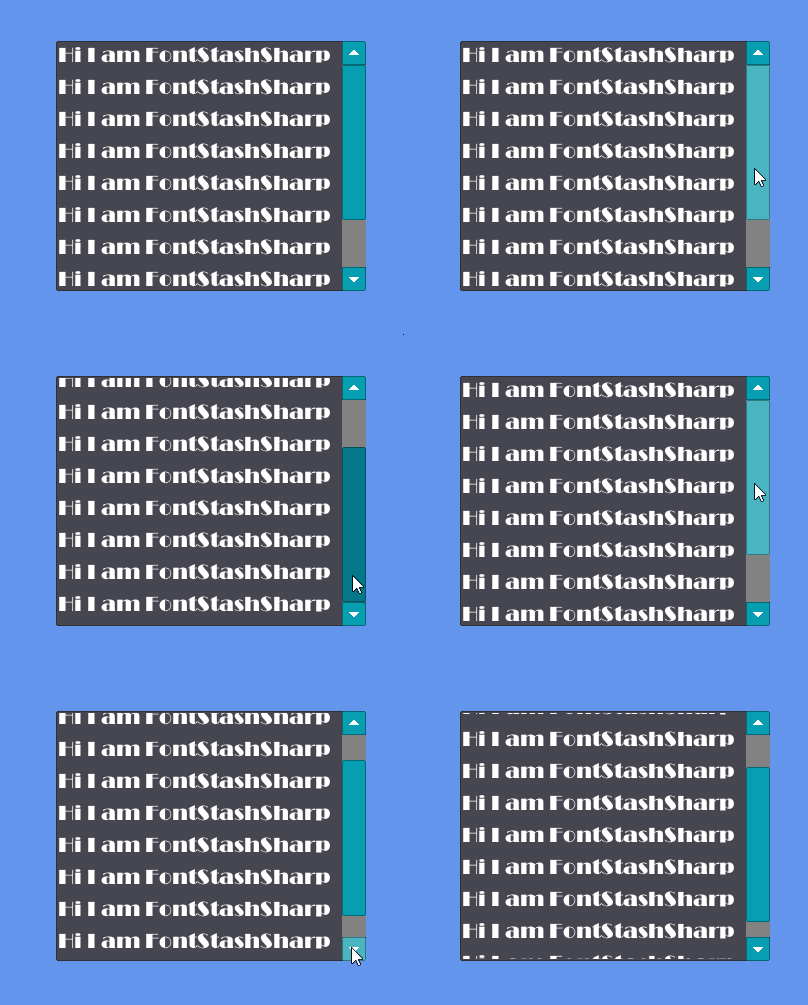
### Code Example - Rendering FontStashSharp in a Gum ItemsControl
This example shows how to create a renderable FontStashSharp object which can be rendered in a list box. As mentioned above, any library can be used.
First we'll begin with a simple code-only project.
Next, we'll add the FontStashSharp NuGet package to our project:
Once we have our project set up to be able to use FontStashSharp. We need to create a class that inherits from `RenderableBase`. This class has the following responsibilities:
1. Initialize our custom rendering system. In this case, Initialize creates a static `SpriteBatch` and `FontSystem` instance. Both of these are static so we can initialize our systems without having to create an instance of our renderable object.
2. Create the `BatchKey` property which tells Gum which objects should be batched together.
3. Create a `StartBatch` and `EndBatch` method which are called whenever a batch starts o rends according to the `BatchKey`.
4. Create a `Render` method which performs custom rendering.
The following block shows the FontStashSharpText class:
```csharp
using FontStashSharp;
using Microsoft.Xna.Framework;
using Microsoft.Xna.Framework.Graphics;
using RenderingLibrary;
using RenderingLibrary.Graphics;
namespace YourGameNamespace;
public class FontStashSharpText : RenderableBase
{
static GraphicsDevice _graphicsDevice;
static SpriteBatch _spriteBatch;
static FontSystem _fontSystem;
public static void Initialize(GraphicsDevice graphicsDevice)
{
_graphicsDevice = graphicsDevice;
_spriteBatch = new SpriteBatch(graphicsDevice);
_fontSystem = new FontSystem();
_fontSystem.AddFont(System.IO.File.ReadAllBytes(@"Content/BROADW.TTF"));
}
public override string BatchKey => "FontStashSharp";
public override void StartBatch(ISystemManagers systemManagers)
{
_spriteBatch.Begin(rasterizerState: _graphicsDevice.RasterizerState);
}
public override void Render(ISystemManagers managers)
{
var position = new Vector2(
this.GetAbsoluteLeft(),
this.GetAbsoluteTop());
var font = _fontSystem.GetFont(24);
_spriteBatch.DrawString(font,
"Hi I am FontStashSharp",
position,
Color.White);
}
public override void EndBatch(ISystemManagers systemManagers)
{
_spriteBatch.End();
}
}
```
This renderable object can be used in the constructor for a GraphicalUiElement. By creating a GraphicalUiElement that wraps this renderable object, we can use the Gum layout and ordering engine, and we can add this to any other Gum object such as an ItemsControl.
The following full game creates a list of FontStashSharpText instances in an ItemsControl:
```csharp
public class Game1 : Game
{
GumService GumUI => GumService.Default;
public Game1()
{
Content.RootDirectory = "Content";
}
protected override void Initialize()
{
GumUI.Initialize(this);
FontStashSharpText.Initialize(GraphicsDevice);
ItemsControl itemsControl = new ItemsControl();
itemsControl.AddToRoot();
itemsControl.Anchor(Anchor.Center);
itemsControl.Width = 310;
itemsControl.Height = 250;
for (int i = 0; i < 10; i++)
{
var fontStashSharp = new FontStashSharpText();
// create a Gum wrapper for positioning:
var gumObject = new GraphicalUiElement(fontStashSharp);
itemsControl.AddChild(gumObject);
}
base.Initialize();
}
protected override void Update(GameTime gameTime)
{
GumUI.Update(gameTime);
base.Update(gameTime);
}
protected override void Draw(GameTime gameTime)
{
GraphicsDevice.Clear(Color.CornflowerBlue);
GumUI.Draw();
base.Draw(gameTime);
}
}
```
FontStashSharpText in Gum
---
# Agent Instructions
This documentation is published with GitBook. GitBook is the documentation platform designed so that both humans and AI agents can read, navigate, and reason over technical content effectively. Learn more at gitbook.com.
## Querying This Documentation
If you need additional information that is not directly available in this page, you can query the documentation by asking a question.
Perform an HTTP GET request on the following URL with the `ask` and `goal` query parameters:
```
GET https://docs.flatredball.com/gum/code/rendering/rendering-custom-graphics.md?ask=&goal=
```
`ask` is the immediate question: it should be specific, self-contained, and written in natural language.
`goal` is what the user is ultimately trying to achieve, the reason they need the answer. Sharing it helps GitBook give you a better, more relevant answer. A goal is most helpful when it describes the outcome the user wants rather than restating the question. For example, with `ask=how do I create an API token`, a goal like `automate deployments from our CI pipeline` lets GitBook tailor the answer to that use case.
The response will contain a direct answer to the question and relevant excerpts and sources from the documentation.
Use this mechanism when the answer is not explicitly present in the current page, you need clarification or additional context, or you want to retrieve related documentation sections.