> For the complete documentation index, see [llms.txt](https://docs.flatredball.com/gum/llms.txt). Markdown versions of documentation pages are available by appending `.md` to page URLs; this page is available as [Markdown](https://docs.flatredball.com/gum/code/standard-visuals/ninesliceruntime.md).
# NineSliceRuntime
### Introduction
The NineSliceRuntime object is used to draw a visual object which references a Texture2D, but which does not stretch the corner pieces of a texture, and which only stretches the edges between the corners along their axis. In other words, the NineSlice (sometimes also referred to as a sprite frame) is used to draw frames in UI which can stretch without introducing visual artifacts.
For more information about the NineSlice type, see the [NineSlice page](/gum/gum-tool/gum-elements/nineslice.md).
### Code Example
The following code can be used to instantiate a NineSliceRuntime which uses a Texture (png file) named Frame.png.
{% hint style="info" %}
**NOTE:** The Frame.png file must have the `Copy to Output Directory` set to either `Copy always` or `Copy if newer`. Otherwise you will get an error: System.IO.IOException 'Could not get the stream for the file C:\path\to\file\Frame.png'
{% endhint %}
```csharp
// Initialize
var nineSlice = new NineSliceRuntime();
nineSlice.SourceFileName = "Frame.png";
nineSlice.Width = 256;
nineSlice.Height = 48;
container.Children.Add(nineSlice);
```
NineSlice using Frame.png
### Assigning NineSlice Texture
NineSlice textures can be assigned using a string property or Texture2D instance. When assigning using a string, the `ToolsUtilities.FileManager.RelativeDirectory` is used to determine the file's directory.
For example, consider a file called Frame.png which is located in the Content directory:
Frame.png in Content
This file can be used as a texture by assigning the RelativeDirectory and then loading Frame.png. Note that RelativeDirectory is usually set to Content, or to the location of the .gumj file.
```csharp
// Initialize
ToolsUtilities.FileManager.RelativeDirectory = "Content";
nineSlice.SourceFileName = "Frame.png";
```
Alternatively, a Texture2D can be assigned directly
```csharp
// Initialize
// assuming MyTexture is a valid Texture2D
nineSlice.Texture = MyTexture;
```
Once a SourceFileName is assigned, the Texture property references a valid Texture2D which can be reused.
```csharp
// Initialize
// assigning SourceFileName results in Texture also being set
firstNineSlice.SourceFileName = "Frame.png";
secondNineSlice.Texture = firstNineSlice.Texture;
```
### Animating a NineSlice
A NineSliceRuntime can also play back a frame-by-frame animation from an `.achx` file. Setting `SourceFileName` to a path ending in `.achx` is auto-detected the same way as a texture file:
```csharp
// Initialize
var nineSlice = new NineSliceRuntime();
nineSlice.SourceFileName = "MyAnimation.achx";
nineSlice.CurrentChainName = "Animation1";
nineSlice.Animate = true;
```
Unlike SpriteRuntime, NineSliceRuntime does not apply a frame's `RelativeX`/`RelativeY` offset. For the full explanation of animation chains, see [Animation Chains](/gum/code/files-and-fonts/animation-chains.md).
### TextureAddressMode and Texture Coordinates
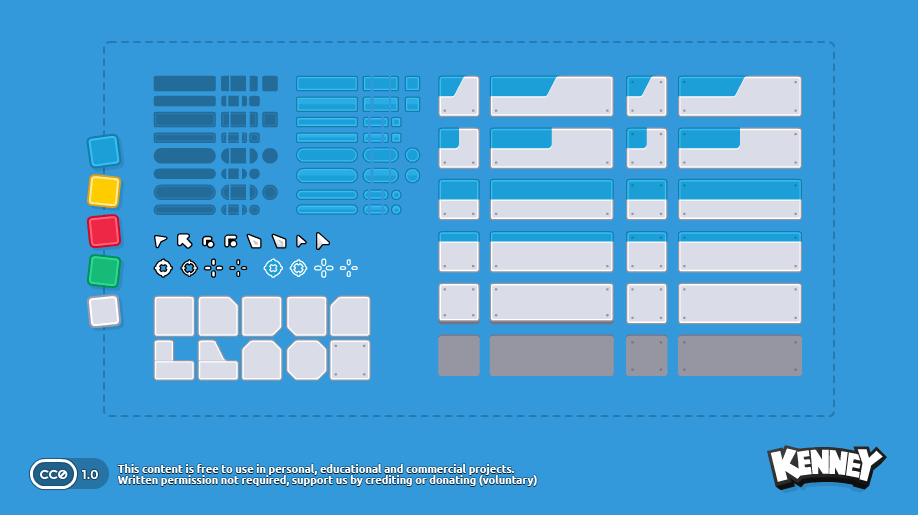
By default a NineSlice uses it entire texture. This can be customized using texture coordinate and TextureAddress properties.
For example, consider drawing a portion of the following texture:
Kenney sprite sheet
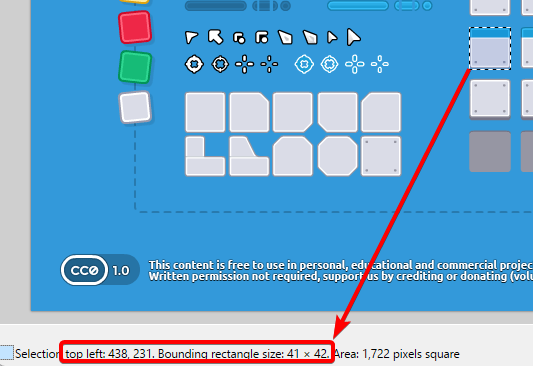
We can obtain a portion of this texture by assigning the coordinate values. Before doing so, find the coordinates of the area you would like to draw. For example, we can use Paint.NET to find the coordinates of a frame in the image.
We can use these values to set `TextureLeft`, `TextureTop`, `TextureWidth`, and `TextureHeight` values as shown in the following code:
```csharp
// Initialize
nineSlice.TextureAddress = Gum.Managers.TextureAddress.Custom;
nineSlice.TextureLeft = 438;
nineSlice.TextureTop = 231;
nineSlice.TextureWidth = 41;
nineSlice.TextureHeight = 42;
```
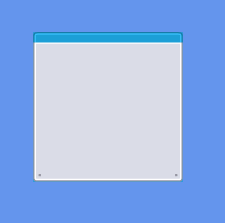
Portion of texture drawn by a NineSlice
Note that if TextureAddress isn't set to Custom, then the four coordinate values are ignored and the entire texture is used.
---
# Agent Instructions
This documentation is published with GitBook. GitBook is the documentation platform designed so that both humans and AI agents can read, navigate, and reason over technical content effectively. Learn more at gitbook.com.
## Querying This Documentation
If you need additional information that is not directly available in this page, you can query the documentation by asking a question.
Perform an HTTP GET request on the following URL with the `ask` and `goal` query parameters:
```
GET https://docs.flatredball.com/gum/code/standard-visuals/ninesliceruntime.md?ask=&goal=
```
`ask` is the immediate question: it should be specific, self-contained, and written in natural language.
`goal` is what the user is ultimately trying to achieve, the reason they need the answer. Sharing it helps GitBook give you a better, more relevant answer. A goal is most helpful when it describes the outcome the user wants rather than restating the question. For example, with `ask=how do I create an API token`, a goal like `automate deployments from our CI pipeline` lets GitBook tailor the answer to that use case.
The response will contain a direct answer to the question and relevant excerpts and sources from the documentation.
Use this mechanism when the answer is not explicitly present in the current page, you need clarification or additional context, or you want to retrieve related documentation sections.
%20(1)%20(1)%20(1)%20(1)%20(1)%20(1)%20(1)%20(1)%20(1)%20(1).png?alt=media)
%20(1)%20(1)%20(1).png?alt=media)