> For the complete documentation index, see [llms.txt](https://docs.flatredball.com/gum/llms.txt). Markdown versions of documentation pages are available by appending `.md` to page URLs; this page is available as [Markdown](https://docs.flatredball.com/gum/gum-tool/gum-elements/shape-properties/has-dropshadow.md).

# Has Dropshadow

{% hint style="info" %}
`Has Dropshadow` is a shape property supported by Circle, Rectangle, ColoredCircle, RoundedRectangle, Arc, and Line.
{% endhint %}

### Introduction

`Has Dropshadow` controls whether a dropshadow is drawn below a shape. By default this value is false.

The following image shows two Rectangles. The left with `Has Dropshadow` unchecked, the right with `Has Dropshadow` checked.

<figure><img src="/files/noIOFMxLvZGq0RxAYuF8" alt=""><figcaption><p>Two RoundedRectangle instances</p></figcaption></figure>

Note that if an instance has a dropshadow, the dropshadow renders outside of the bounds of the instance.

<figure><img src="/files/ORsPshMRc6B6IC63cwJ6" alt=""><figcaption><p>Dark pixels from a dropshadow rendering below the bounds of a RoundedRectangle</p></figcaption></figure>

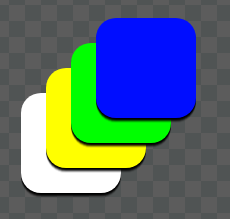
Dropshadows draw as part of the object, so if multiple objects stack, their dropshadows also stack.

<figure><img src="/files/5PMwSKL3RU1qwcJsDcdk" alt=""><figcaption><p>Multiple stacked ColoredRectangles with dropshadows</p></figcaption></figure>

### `Dropshadow Offset X` and `Dropshadow Offset Y`

`Dropshadow Offset X` and `Dropshadow Offset Y` control the position of the dropshadow relative to the main body of the instance.

This value can be changed to move the dropshadow, which gives the element a sense of height.

<figure><img src="/files/Z1cr1vVYVkvNk8aQpr5s" alt=""><figcaption><p><code>Dropshadow Offset X</code> and <code>Dropshadow Offset Y</code> change the dropshadow position</p></figcaption></figure>

### `Dropshadow Blur`

`Dropshadow Blur` controls the dropshadow edge softness. A value of 0 creates a sharp shadow, while a larger value increases blur.

<figure><img src="/files/5bJnYEmG3CD2gt5yYIvr" alt=""><figcaption><p><code>Dropshadow Blur</code> can be adjusted to make a dropshadow more blurry</p></figcaption></figure>

{% hint style="info" %}
`Dropshadow Blur` values roughly measure the number of pixels that it takes to interpolate the edge of a shadow from its full color to fully transparent. This value is not exact due to antialiasing.
{% endhint %}

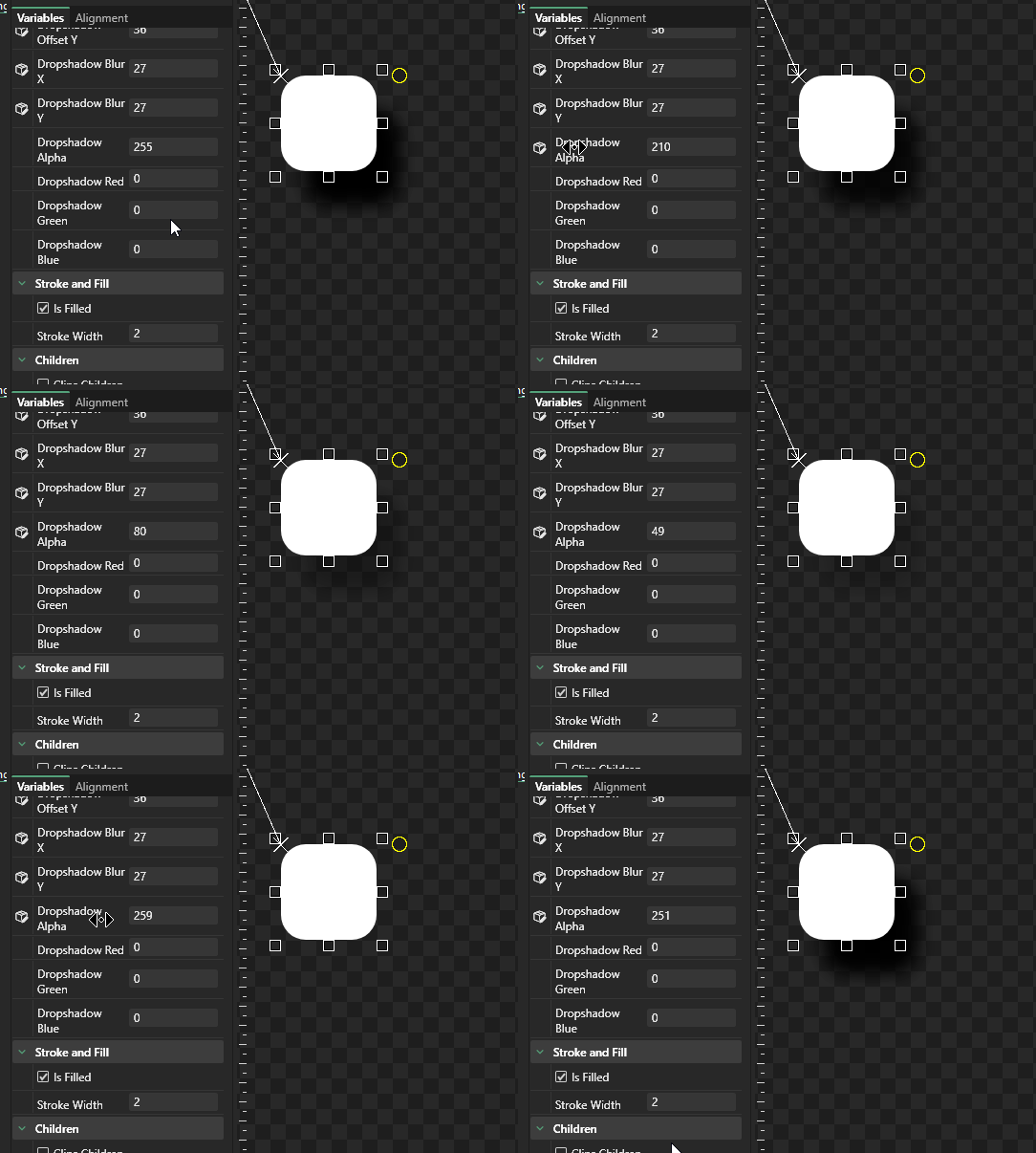
### `Dropshadow Alpha`

`Dropshadow Alpha` controls the transparency of a dropshadow. A fully-opaque dropshadow has an alpha of 255. This value can be modified to decrease or increase the dropshadow's opacity.

<figure><img src="/files/hXil2XSuCTlhlUttJsX5" alt=""><figcaption><p><code>Dropshadow Alpha</code> adjusts the dropshadow transparency</p></figcaption></figure>

### `Dropshadow Color`

Dropshadow Color adjusts the dropshadow color independent of the shape's body color. Usually dropshadows are pure black with their transparency adjusted by `Dropshadow Alpha`, but they can also include other colors if needed.

<figure><img src="/files/YuMfYGKquZjTFzWWbGov" alt=""><figcaption><p>Dropshadow color can be changed to create shadow/blur effects</p></figcaption></figure>


---

# Agent Instructions
This documentation is published with GitBook. GitBook is the documentation platform designed so that both humans and AI agents can read, navigate, and reason over technical content effectively. Learn more at gitbook.com.

## Querying This Documentation
If you need additional information that is not directly available in this page, you can query the documentation dynamically by asking a question.

Perform an HTTP GET request on the current page URL with the `ask` query parameter, and the optional `goal` query parameter:

```
GET https://docs.flatredball.com/gum/gum-tool/gum-elements/shape-properties/has-dropshadow.md?ask=<question>&goal=<endgoal>
```

`ask` is the immediate question: it should be specific, self-contained, and written in natural language.
`goal` is optional and describes the broader end goal you are ultimately trying to accomplish on behalf of the user. GitBook uses it to tailor the answer towards what is most useful for that goal.

The response will contain a direct answer to the question and relevant excerpts and sources from the documentation.

Use this mechanism when the answer is not explicitly present in the current page, you need clarification or additional context, or you want to retrieve related documentation sections.