> For the complete documentation index, see [llms.txt](https://docs.flatredball.com/gum/llms.txt). Markdown versions of documentation pages are available by appending `.md` to page URLs; this page is available as [Markdown](https://docs.flatredball.com/gum/code/localization.md).
# Localization
## Introduction
Gum supports localization using CSV and RESX files. Localization can be performed automatically by linking a localization file in your Gum project, or it can be done by hand in code-only projects. This document explains how to use the `LocalizationManager` to perform localization.
## Localization in Gum Projects (Using the Gum UI Tool)
If you are using the Gum UI Tool to create your project, you can add and test localization in the tool itself. For information on how to set up localization in the Gum UI tool, see the [Localization page](/gum/gum-tool/localization.md).
Once you have a project set up with localization, the only code change needed is to specify the language index. In the Gum UI tool, you select a language by name from a dropdown. At runtime in code, you set `CurrentLanguage` as an integer index: index 0 is the string ID column, index 1 is the first language column, index 2 is the second, and so on. If `CurrentLanguage` is left at its default value of 0, your game will display the raw string IDs.
For example, the following is a screenshot from the Gum UI tool:
Screen displaying string IDs
At runtime the string IDs are displayed by default:
Screen displaying string IDs
We can select our string IDs before creating our screen:
{% tabs %}
{% tab title="Generated Code" %}
```csharp
protected override void Initialize()
{
var project = GumUI.Initialize(this, "GumProject/GumProject.gumj");
// set the language index before instantiating a screen or component:
GumUI.LocalizationService.CurrentLanguage = 1;
var screen = new MainMenu();
screen.AddToRoot();
base.Initialize();
}
```
{% endtab %}
{% tab title="No Generated Code" %}
```csharp
protected override void Initialize()
{
var project = GumUI.Initialize(this, "GumProject/GumProject.gumj");
// set the language index before calling ToGraphicalUiElement:
GumUI.LocalizationService.CurrentLanguage = 1;
var screen = project.Screens.First().ToGraphicalUiElement();
screen.AddToRoot();
base.Initialize();
}
```
{% endtab %}
{% endtabs %}
Screen with localization
## Localization and Font Ranges
Localized games may need an extended font range. If using the Gum tool, see the [Font Settings](/gum/gum-tool/fonts.md#character-ranges) page for information on font ranges.
## Localization in a Code-Only Project
Code-only projects can use the `LocalizationManager` to enable localization. The steps for localization are:
1. Create a localization CSV or RESX files
2. Add these files to your project in such a way as to obtain a stream to them
3. Call the appropriate method for loading these files
4. Set the language index
5. Assign Text to a string ID
{% hint style="info" %}
How you open the stream depends on your platform. XNA-like platforms (MonoGame, KNI, FNA) bundle content files into the app package and require `TitleContainer.OpenStream` to read them — this is the only approach that works on iOS, Android, consoles, and web. Non-XNA platforms (raylib, SkiaSharp, and plain desktop apps) can read content directly from the filesystem with `File.OpenRead`. The examples below show both.
{% endhint %}
### Code Example: Loading from CSV
This example uses a CSV file with the following contents:
```csv
String ID,English,Spanish
T_OK,OK,OK
T_Cancel,Cancel,Cancelar
T_Submit,Submit,Entregar
T_Greeting,"Welcome, this is a localized project example","Bienvenido, este es un ejemplo de proyecto localizado."
```
{% tabs %}
{% tab title="XNA-like (MonoGame/KNI/FNA)" %}
```csharp
// Initialize
using Gum.Localization; // for extension methods
using Microsoft.Xna.Framework; // for TitleContainer
// ...
protected override void Initialize()
{
//var project = GumUI.Initialize(this, "GumProject/GumProject.gumj");
GumUI.Initialize(this);
var localizationService = GumUI.LocalizationService;
// TitleContainer opens content bundled into the app package.
// This is required on iOS, Android, consoles, and web.
using var stream = TitleContainer.OpenStream("Content/LocalizationDB.csv");
localizationService.AddCsvDatabase(stream);
// set the language index before creating your UI:
localizationService.CurrentLanguage = 2;
// create UI using the string IDs:
StackPanel panel = new();
panel.AddToRoot();
panel.Anchor(Anchor.Center);
Label label = new();
panel.AddChild(label);
label.Text = "T_Greeting";
Button okButton = new();
panel.AddChild(okButton);
okButton.Text = "T_OK";
Button cancelButton = new();
panel.AddChild(cancelButton);
cancelButton.Text = "T_Cancel";
}
```
{% endtab %}
{% tab title="Non-XNA (raylib, SkiaSharp, etc.)" %}
```csharp
// Initialize
using Gum.Localization; // for extension methods
// ...
protected override void Initialize()
{
//var project = GumUI.Initialize(this, "GumProject/GumProject.gumj");
GumUI.Initialize(this);
var localizationService = GumUI.LocalizationService;
// obtain a stream to your localization data
using var stream = System.IO.File.OpenRead("Content/LocalizationDB.csv");
localizationService.AddCsvDatabase(stream);
// set the language index before creating your UI:
localizationService.CurrentLanguage = 2;
// create UI using the string IDs:
StackPanel panel = new();
panel.AddToRoot();
panel.Anchor(Anchor.Center);
Label label = new();
panel.AddChild(label);
label.Text = "T_Greeting";
Button okButton = new();
panel.AddChild(okButton);
okButton.Text = "T_OK";
Button cancelButton = new();
panel.AddChild(cancelButton);
cancelButton.Text = "T_Cancel";
}
```
{% endtab %}
{% endtabs %}
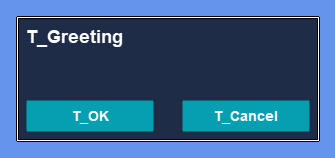
Label and Buttons displaying localized UI
### Code Example: Loading from RESX
RESX files are the standard .NET resource format and integrate well with tools like Visual Studio's resource editor. Gum loads a base RESX file and automatically discovers satellite files (named by culture code) alongside it.
This example uses a base file `Strings.resx` with English entries:
```xml
OKCancelWelcome, this is a localized project example
```
A satellite `Strings.es.resx` sits next to it with the Spanish translations (same keys, translated values).
{% tabs %}
{% tab title="XNA-like (MonoGame/KNI/FNA)" %}
The path-based overload uses `Directory.GetFiles` to auto-discover satellites, which does not work with bundled content. Open the base file and each satellite as streams via `TitleContainer` and pass them as `(languageName, stream)` pairs:
```csharp
// Initialize
using Gum.Localization; // for extension methods
using Microsoft.Xna.Framework; // for TitleContainer
// ...
protected override void Initialize()
{
GumUI.Initialize(this);
var localizationService = GumUI.LocalizationService;
var streams = new (string languageName, System.IO.Stream stream)[]
{
("Default", TitleContainer.OpenStream("Content/Strings.resx")),
("es", TitleContainer.OpenStream("Content/Strings.es.resx")),
};
localizationService.AddResxDatabase(streams);
// index 0 is the string ID, index 1 is "Default" (base file),
// index 2+ are satellites in the order they are passed
localizationService.CurrentLanguage = 2; // Spanish
Label label = new();
label.AddToRoot();
label.Text = "T_Greeting";
}
```
{% endtab %}
{% tab title="Non-XNA (raylib, SkiaSharp, etc.)" %}
```csharp
// Initialize
using Gum.Localization; // for extension methods
// ...
protected override void Initialize()
{
GumUI.Initialize(this);
var localizationService = GumUI.LocalizationService;
// pass the path to the base .resx file; satellites are auto-discovered
localizationService.AddResxDatabase("Content/Strings.resx");
// index 0 is the string ID, index 1 is "Default" (base file),
// index 2+ are satellites in the order they are discovered
localizationService.CurrentLanguage = 2; // Spanish
Label label = new();
label.AddToRoot();
label.Text = "T_Greeting";
}
```
{% endtab %}
{% endtabs %}
{% hint style="info" %}
Satellite discovery uses the file naming convention `BaseName..resx` (for example `Strings.es.resx`, `Strings.fr.resx`). The base file is labeled `"Default"`; each satellite is labeled with its culture code.
{% endhint %}
### Multiple RESX Files
Larger projects often split localized strings across several base files — for example, one per feature area. This is the layout used by tools like [ResXResourceManager](https://github.com/dotnet/ResXResourceManager), where strings are organized into files such as `Strings.resx`, `Buttons.resx`, and `Errors.resx`, each with its own satellites:
```
Content/
Strings.resx
Strings.es.resx
Buttons.resx
Buttons.es.resx
Errors.resx
Errors.es.resx
```
Pass the collection of base files (or groups of streams) to `AddResxDatabase`. Gum merges keys across all files into a single database:
{% tabs %}
{% tab title="XNA-like (MonoGame/KNI/FNA)" %}
Build one group per base file. Each group is a collection of `(languageName, stream)` pairs and may optionally be named — the group name appears in collision-warning messages:
```csharp
// Initialize
using Microsoft.Xna.Framework; // for TitleContainer
// ...
var localizationService = GumUI.LocalizationService;
var groups = new (string? groupName, IEnumerable<(string, System.IO.Stream)>)[]
{
("Strings", new[]
{
("Default", TitleContainer.OpenStream("Content/Strings.resx")),
("es", TitleContainer.OpenStream("Content/Strings.es.resx")),
}),
("Buttons", new[]
{
("Default", TitleContainer.OpenStream("Content/Buttons.resx")),
("es", TitleContainer.OpenStream("Content/Buttons.es.resx")),
}),
("Errors", new[]
{
("Default", TitleContainer.OpenStream("Content/Errors.resx")),
("es", TitleContainer.OpenStream("Content/Errors.es.resx")),
}),
};
localizationService.AddResxDatabase(
groups,
onWarning: message => System.Diagnostics.Trace.WriteLine(message));
localizationService.CurrentLanguage = 2;
```
{% endtab %}
{% tab title="Non-XNA (raylib, SkiaSharp, etc.)" %}
```csharp
// Initialize
var localizationService = GumUI.LocalizationService;
var baseFiles = new[]
{
"Content/Strings.resx",
"Content/Buttons.resx",
"Content/Errors.resx",
};
localizationService.AddResxDatabase(
baseFiles,
onWarning: message => System.Diagnostics.Trace.WriteLine(message));
localizationService.CurrentLanguage = 2;
```
{% endtab %}
{% endtabs %}
{% hint style="warning" %}
If the same key appears in more than one base file, the **last write wins**. When an `onWarning` callback is provided, Gum invokes it once per colliding key with a message listing every source file that defined the key.
{% endhint %}
The set of languages is the union of cultures across all base files. If `Strings.resx` has an `es` satellite but `Buttons.resx` does not, keys from `Buttons.resx` fall back to their string ID when `es` is selected.
{% hint style="warning" %}
**Bundled-content platforms and `.gumj` auto-load**
When you pass a `.gumj` file to `GumUI.Initialize(this, "…gumj")` that references RESX localization files, Gum auto-loads them from the filesystem using `Directory.GetFiles` for satellite discovery. This works on desktop platforms (Windows, Linux, macOS) and on any platform that exposes a real filesystem to the running app.
It does **not** work on bundled-content platforms — iOS, Android, consoles, and web — where `Content/` files are packed into the app bundle and can only be read via `TitleContainer.OpenStream`. On those platforms, skip the `.gumj`-driven auto-load for RESX and call `AddResxDatabase(groups, ...)` manually with streams as shown in the XNA-like tab above. CSV auto-load has the same limitation.
A stream-based auto-load path for bundled content is on the roadmap. If this is blocking you, let us know on Discord or file an issue on [GitHub](https://github.com/vchelaru/Gum/issues) — real usage reports help us prioritize.
{% endhint %}
## Switching Language at Runtime
Gum re-translates already-instantiated visuals when you change `CurrentLanguage`. You do not need to recreate screens or rebuild controls — assigning a new value triggers the refresh automatically.
```csharp
// switch to Spanish — all visible text re-translates in place
GumUI.LocalizationService.CurrentLanguage = 2;
```
{% hint style="info" %}
Automatic runtime language switching requires the May 2026 Gum release or newer. On earlier versions, changing `CurrentLanguage` only affected text assigned *after* the change — already-displayed text kept its old translation, and the only way to refresh was to recreate the screen.
{% endhint %}
The refresh walks `Root`, `PopupRoot`, and `ModalRoot` and re-applies the original string ID assigned to each control's `Text`, `Header`, or `Placeholder`. State-driven text (e.g. a `Highlighted` state that sets `Text` to a different string ID) refreshes correctly because the most recently assigned string ID is what gets re-translated.
If you need to refresh manually — for example, after building visuals that aren't attached to one of the standard roots — call `RefreshLocalization` directly:
```csharp
GumUI.RefreshLocalization();
```
### Behavior of Untranslated Text on Refresh
Text assigned via `SetTextNoTranslate` (or `SetHeaderNoTranslate` / `SetPlaceholderNoTranslate`) is *not* touched by refresh. This is what makes user input in a `TextBox` survive language switches — TextBox routes typing, pasting, and deleting through the no-translate path internally.
Programmatic dynamic strings should also use the no-translate API. For example:
```csharp
// dynamic value — bypasses translation, survives language switches as-is
scoreLabel.SetTextNoTranslate($"Score: {score}");
// localizable value — picks up the new language on switch
greetingLabel.Text = "T_Greeting";
```
If you assign a dynamic string through the localized `Text` property while a `LocalizationService` is active, Gum will treat it as a string ID. On the first assignment it gets the `(loc)` missing-key suffix; on every subsequent language switch it will be re-translated and pick up the suffix again.
### Data Bindings
If a control's `Text` is data-bound, refreshing the language will overwrite the bound value with a re-translated string ID. Refresh while bindings are active is not supported — prefer `SetTextNoTranslate` for bound text, or unbind before switching.
## Forms Control Localization
Forms controls localize text automatically when a `LocalizationService` is active. When you assign a string ID to a control's `Text` property (or `Header` for MenuItem, `Placeholder` for TextBox), Gum translates it at assignment time. Each control that supports localization also provides a no-translate method for setting literal text that should not be translated.
### Localization by Control
The following table shows how each Forms control handles localization:
| Control | Localized Property | No-Translate Method | Notes |
| ------------ | ------------------ | ----------------------------- | ------------------------------------------------------------------------------- |
| Button | `Text` | `SetTextNoTranslate()` | |
| Label | `Text` | `SetTextNoTranslate()` | |
| CheckBox | `Text` | `SetTextNoTranslate()` | |
| RadioButton | `Text` | `SetTextNoTranslate()` | |
| TextBox | `Text` | `SetTextNoTranslate()` | Setting `Text` in code localizes. User-typed text does not localize. See below. |
| TextBoxBase | `Placeholder` | `SetPlaceholderNoTranslate()` | Placeholder text localizes when set in code. |
| MenuItem | `Header` | `SetHeaderNoTranslate()` | |
| PasswordBox | — | — | Mask characters are never localized. |
| ComboBox | — | — | Text comes from selected item. Pre-translate items before adding. |
| ListBoxItem | — | — | Text comes from data items. Pre-translate items before adding. |
| ScrollBar | — | — | No text property. |
| Slider | — | — | No text property. |
| ToggleButton | — | — | No text property. |
### TextBox Localization Behavior
TextBox has special behavior because it handles both programmatic text and user-typed input:
* Setting `Text` in code applies localization — use this for initial values that should be translated.
* Text entered by the user through typing, pasting, or deleting is never localized. TextBox internally uses `SetTextNoTranslate` for all user-initiated edits.
* The `Placeholder` property (from TextBoxBase) is localized when set in code.
For example, if you set a TextBox's `Text` to a string ID, it displays the translated text. Once the user begins editing, their input is used as-is without translation.
### Data-Driven Controls
ComboBox and ListBoxItem intentionally bypass localization. Their displayed text comes from data objects (via `ToString()`), so translating would attempt to look up the data value as a string ID.
To localize items in a ComboBox or ListBox, translate the values before adding them to the `Items` collection:
```csharp
// Initialize
var comboBox = new ComboBox();
comboBox.AddToRoot();
var localizationService = GumUI.LocalizationService;
comboBox.Items.Add(localizationService.Translate("T_Option1"));
comboBox.Items.Add(localizationService.Translate("T_Option2"));
comboBox.Items.Add(localizationService.Translate("T_Option3"));
```
### Using SetTextNoTranslate
Every localization-aware control provides a method for setting text without translation. This is useful when displaying dynamic values that should not be treated as string IDs:
```csharp
// Initialize
var label = new Label();
label.AddToRoot();
// This localizes — "T_Score" is looked up in the localization database
label.Text = "T_Score";
// This does NOT localize — the literal string is displayed as-is
label.SetTextNoTranslate("1,250 pts");
```
{% hint style="info" %}
`SetTextNoTranslate` is a method rather than a property because the underlying text component only stores the final string. A `TextNoTranslate` property getter would be misleading since there is no way to distinguish translated from untranslated text after assignment.
{% endhint %}
---
# Agent Instructions
This documentation is published with GitBook. GitBook is the documentation platform designed so that both humans and AI agents can read, navigate, and reason over technical content effectively. Learn more at gitbook.com.
## Querying This Documentation
If you need additional information that is not directly available in this page, you can query the documentation by asking a question.
Perform an HTTP GET request on the following URL with the `ask` and `goal` query parameters:
```
GET https://docs.flatredball.com/gum/code/localization.md?ask=&goal=
```
`ask` is the immediate question: it should be specific, self-contained, and written in natural language.
`goal` is what the user is ultimately trying to achieve, the reason they need the answer. Sharing it helps GitBook give you a better, more relevant answer. A goal is most helpful when it describes the outcome the user wants rather than restating the question. For example, with `ask=how do I create an API token`, a goal like `automate deployments from our CI pipeline` lets GitBook tailor the answer to that use case.
The response will contain a direct answer to the question and relevant excerpts and sources from the documentation.
Use this mechanism when the answer is not explicitly present in the current page, you need clarification or additional context, or you want to retrieve related documentation sections.

%20(1).png?alt=media)
