> For the complete documentation index, see [llms.txt](https://docs.flatredball.com/gum/llms.txt). Markdown versions of documentation pages are available by appending `.md` to page URLs; this page is available as [Markdown](https://docs.flatredball.com/gum/code/performance-and-optimization/measuring-layout-calls.md).
# Measuring Layout Calls
## Introduction
Gum's layout engine, although fairly efficient, can introduce performance problems for complex scenes, or scenes which are updated frequently. This page discusses:
* Gum's default layout behavior
* How to measure layouts for performance problems
* How to improve your layout performance
## Default Layout Behavior
`GraphicalUiElements` (visuals for controls) provide many variables for controlling absolute position and size. These include:
* Position values such as X and Y
* Size values such as Width and Height
* Unit values such as XUnits or WidthUnits
* Rotation
A `GraphicalUiElement's` absolute position or size can also be affected by its `Parent`, `Children`, and even siblings. Therefore, changing any of these values can result in one or more objects performing a layout.
Layouts are performed immediately after a value is set so that absolute values are (by default) always up-to-date.
For example, we can see that a `StackPanel's` `Visual` always reflects its size after every child is added.
```csharp
// Initialize
StackPanel stackPanel = new();
stackPanel.AddToRoot();
stackPanel.Anchor(Anchor.Center);
for(int i = 0; i < 10; i++)
{
float heightBefore = stackPanel.Visual.AbsoluteHeight;
Label label = new();
stackPanel.AddChild(label);
float heightAfter = stackPanel.Visual.AbsoluteHeight;
label.Text =
$"Label {i + 1} (StackPanel Height: {heightBefore} -> {heightAfter})";
}
```
StackPanel displaying its size
This code shows that a `StackPanel's` absolute height is calculated after every `AddChild` call. Note that the absolute height is calculated whether we access `AbsoluteHeight` or not - this property simply retrieves the already-calculated value.
This behavior has the benefit of an object always updating its most up-to-date position and size, but it has the downside of performing potentially unnecessary layout calls.
Most of the time these extra layout calls don't have an impact on performance; however complex layouts may slow down projects due to this behavior.
## Measuring Layouts
The number of layout calls which have been performed can be obtained from the `GraphicalUiElement.UpdateLayoutCallCount` static property. This reports the total number of layouts, so usually a before-and-after is often useful.
We can modify the code above to display layout call counts when each label is created. Note that this code increases to create 20 Label instances:
{% hint style="info" %}
Although each call count has a slight performance cost, Gum can efficiently perform hundreds of layout calls. Most of the time these layout will not cause performance problems for games.
Also, the layout calls displayed above are for illustrative purposes. The exact number of calls is not important, and these call counts are likely to change as future versions of Gum are released.
{% endhint %}
We can notice a few things when looking at this code:
1. `UpdateLayoutCallCount` increases after every item is added
2. The amount of `UpdateLayoutCallCount` increase grows as more items are added to the StackPanel
Based on the screenshot above, our project is performing over 1000 unnecessary layout call counts. At least, in a typical game the final layout is only needed when drawing is performed, not after every item add.
It's important to note that a single control may perform multiple layout calls when a single variable is changed. For example, consider the following code:
```csharp
// Initialize
Button button = new();
button.AddToRoot();
button.Anchor(Anchor.Center);
int countBefore = GraphicalUiElement.UpdateLayoutCallCount;
button.Width = 200;
button.Height = 40;
int countAfter = GraphicalUiElement.UpdateLayoutCallCount;
button.Text = $"{countAfter - countBefore} layouts performed";
```
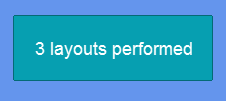
You may expect the code above to perform only 2 layout calls, but we see the number is actually higher:
Number of layout calls displayed by a button
Remember that even a simple control, like a Button, is made of multiple visuals:
* The main Visual itself
* The text
* The background
Therefore, changing the button's Width requires multiple visuals to update their layout.
## Reducing Layout Calls
We can improve the performance of our code by setting `GraphicalUiElement.IsAllLayoutSuspended` to true, then resuming layout it after the adds have finished:
This same flag also defers font atlas generation, which is the recommended way to batch font property changes on a `TextRuntime` — see [Font Performance](/gum/code/files-and-fonts/fonts/font-performance.md) for the font-specific story.
## States and Layout Calls
States can be used to set multiple variables at once. Internally Gum automatically suppresses and resumes layouts when states are applied. The following code shows how to apply states to a button. Notice that fewer layout calls are performed compared to explicitly setting each value:
```csharp
// Initialize
Button button = new();
button.AddToRoot();
button.Anchor(Anchor.Center);
int countBefore = GraphicalUiElement.UpdateLayoutCallCount;
StateSave state = new StateSave();
state.Variables.Add(new VariableSave
{
Name = "Width",
Value = 200f
});
state.Variables.Add(new VariableSave
{
Name = "Height",
Value = 40f
});
button.Visual.ApplyState(state);
int countAfter = GraphicalUiElement.UpdateLayoutCallCount;
button.Text = $"{countAfter - countBefore} layouts performed";
```
Setting states can reduce layout call count
---
# Agent Instructions
This documentation is published with GitBook. GitBook is the documentation platform designed so that both humans and AI agents can read, navigate, and reason over technical content effectively. Learn more at gitbook.com.
## Querying This Documentation
If you need additional information that is not directly available in this page, you can query the documentation by asking a question.
Perform an HTTP GET request on the following URL with the `ask` and `goal` query parameters:
```
GET https://docs.flatredball.com/gum/code/performance-and-optimization/measuring-layout-calls.md?ask=&goal=
```
`ask` is the immediate question: it should be specific, self-contained, and written in natural language.
`goal` is what the user is ultimately trying to achieve, the reason they need the answer. Sharing it helps GitBook give you a better, more relevant answer. A goal is most helpful when it describes the outcome the user wants rather than restating the question. For example, with `ask=how do I create an API token`, a goal like `automate deployments from our CI pipeline` lets GitBook tailor the answer to that use case.
The response will contain a direct answer to the question and relevant excerpts and sources from the documentation.
Use this mechanism when the answer is not explicitly present in the current page, you need clarification or additional context, or you want to retrieve related documentation sections.