> For the complete documentation index, see [llms.txt](https://docs.flatredball.com/gum/llms.txt). Markdown versions of documentation pages are available by appending `.md` to page URLs; this page is available as [Markdown](https://docs.flatredball.com/gum/code/getting-started/setup/setup-for-gumbatch.md).
# Setup for GumBatch (Optional)
### Introduction
Gum provides a GumBatch object which works similar to SpriteBatch. It can be used for *immediate mode* rendering, which allows for calling `Begin`, `Draw`, and `End` just like SpriteBatch. This is useful if your project requires mixing Gum and your game's own rendering, or if you are more comfortable using a SpriteBatch-like interface.
This page assumes you have an existing project (empty or otherwise), and that you have already added Gum. For information on getting your project set up, see the [Adding/Initializing Gum section](/gum/code/getting-started/setup/adding-initializing-gum.md).
Usage of GumBatch is completely optional, and it is only needed if you want to draw Gum objects at a particular point in your drawing code. If you are using Gum to load .gumj projects, or if you would like Gum to handle all UI or HUD rendering, then you do not need to use GumBatch.
### GumBatch Quick Start
This quick start uses **KernSmith** to generate font atlases in memory at runtime. This means you do not need to ship any `.fnt` or `.png` font files with your game — fonts are created on demand from whatever size and family you ask for. KernSmith is the recommended font path for MonoGame and KNI projects.
{% hint style="info" %}
The KernSmith package (`KernSmith.MonoGameGum` or `KernSmith.KniGum`) is for **dynamic font generation** — it creates a `BitmapFont` from any font and size in memory at runtime. It's the recommended font path for MonoGame and KNI, but it is separate from GumBatch and entirely optional: if you prefer to make and ship your own `.fnt` files, you can skip it and use [Alternative: Loading a .fnt File](#alternative-loading-a-fnt-file) below. For the full picture, see the [Fonts](/gum/code/files-and-fonts/fonts.md) hub and [Font Strategies](/gum/code/files-and-fonts/fonts/font-strategies.md) pages.
{% endhint %}
To initialize a GumBatch, you must:
* Add the KernSmith NuGet package for your runtime
* Declare a GumBatch at class scope
* Initialize the Gum SystemManagers
* Assign a `KernSmithFontCreator` so fonts can be generated on demand
* Create a `BitmapFont` for whatever font/size you want to draw
* Draw with GumBatch in your Draw
The KernSmith package you add depends on your runtime:
{% tabs %}
{% tab title="MonoGame" %}
Add the `KernSmith.MonoGameGum` NuGet package to your project.
{% endtab %}
{% tab title="KNI" %}
Add the `KernSmith.KniGum` NuGet package to your project.
{% endtab %}
{% endtabs %}
The rest of the setup is identical on both runtimes — they share the same `MonoGameGum` API. The following shows a simple Game1.cs file which renders Gum Text using KernSmith:
```csharp
using Gum.Wireframe;
using KernSmith.Gum;
using Microsoft.Xna.Framework;
using Microsoft.Xna.Framework.Graphics;
using Gum;
using RenderingLibrary.Graphics;
using RenderingLibrary.Graphics.Fonts;
public class Game1 : Game
{
private GraphicsDeviceManager _graphics;
BitmapFont font;
GumBatch gumBatch;
public Game1()
{
_graphics = new GraphicsDeviceManager(this);
Content.RootDirectory = "Content";
IsMouseVisible = true;
}
protected override void Initialize()
{
GumService.Default.Initialize(this);
CustomSetPropertyOnRenderable.InMemoryFontCreator =
new KernSmithFontCreator(GraphicsDevice);
gumBatch = new GumBatch();
font = CustomSetPropertyOnRenderable.InMemoryFontCreator
.TryCreateFont(new BmfcSave
{
FontName = "Arial",
FontSize = 24,
});
base.Initialize();
}
protected override void Draw(GameTime gameTime)
{
GraphicsDevice.Clear(Color.CornflowerBlue);
gumBatch.Begin();
gumBatch.DrawString(
font,
"This is using Gum Batch",
new Vector2(0, 150),
Color.White);
gumBatch.End();
base.Draw(gameTime);
}
}
```
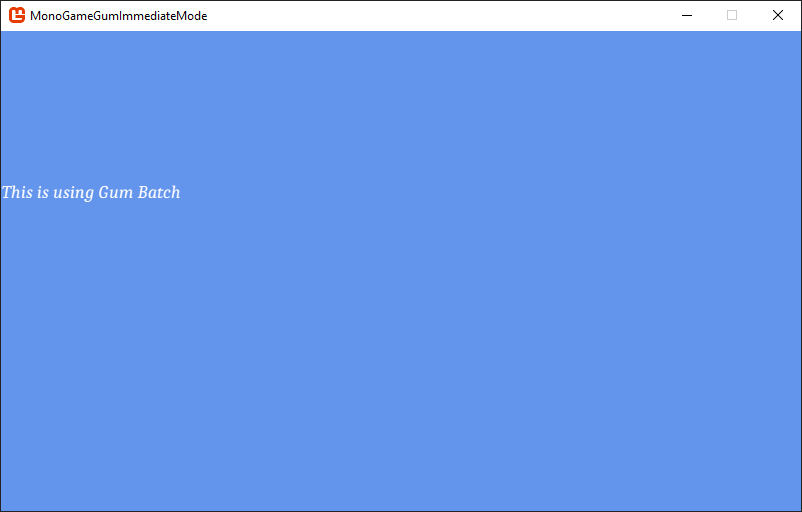
This code produces the following image:
GumBatch rendering text
`BmfcSave` is a small description of the font you want — `FontName`, `FontSize`, `IsBold`, `IsItalic`, `OutlineThickness`, and `UseSmoothing` are the most common properties. KernSmith reads it, rasterizes the glyphs into a texture, and returns a `BitmapFont` you can immediately use with `DrawString`.
By default `FontName` refers to a font installed on the operating system (such as `"Arial"` on Windows). To ship your own `.ttf` files instead — recommended for any font your game depends on — see [Registering Custom .ttf Fonts](/gum/code/files-and-fonts/fonts/font-strategies.md#registering-custom-ttf-fonts).
{% hint style="info" %}
KernSmith dynamic font generation is available today on MonoGame and KNI. SkiaGum has its own built-in dynamic rasterization. Raylib has dynamic fonts through its own path (not KernSmith). For runtimes that do not yet support dynamic generation, use a pre-built `.fnt` file as shown in [Alternative: Loading a .fnt File](#alternative-loading-a-fnt-file) below.
{% endhint %}
For a more detailed discussion of using GumBatch, see the [GumBatch](/gum/code/rendering/gumbatch.md) page.
### Alternative: Loading a .fnt File
If you have a hand-tuned `.fnt` file (for example one produced by the Gum tool's FontCache, or by an external tool such as bmfont) you can load it directly instead of generating with KernSmith:
```csharp
// Initialize
font = new RenderingLibrary.Graphics.BitmapFont(
"Fonts/Font18Caladea.fnt",
SystemManagers.Default);
```
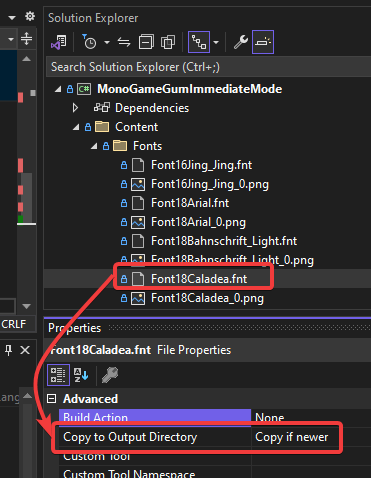
This code assumes a font `.fnt` file (and its matching `.png`) are in the `Content/Fonts/` folder. All content is loaded relative to the Content folder, just like normal content in MonoGame. Note that this content does not use the content pipeline, but must be set to **Copy to Output**.
.fnt file copied to output folder
For more information on loading FNT files, see the [File Loading](/gum/code/files-and-fonts/file-loading.md) documentation. For a fuller comparison of font strategies (dynamic vs. pre-baked, OS fonts vs. shipped `.ttf` files, large character sets, localization), see the [Fonts](/gum/code/files-and-fonts/fonts.md) hub page.
---
# Agent Instructions
This documentation is published with GitBook. GitBook is the documentation platform designed so that both humans and AI agents can read, navigate, and reason over technical content effectively. Learn more at gitbook.com.
## Querying This Documentation
If you need additional information that is not directly available in this page, you can query the documentation by asking a question.
Perform an HTTP GET request on the following URL with the `ask` and `goal` query parameters:
```
GET https://docs.flatredball.com/gum/code/getting-started/setup/setup-for-gumbatch.md?ask=&goal=
```
`ask` is the immediate question: it should be specific, self-contained, and written in natural language.
`goal` is what the user is ultimately trying to achieve, the reason they need the answer. Sharing it helps GitBook give you a better, more relevant answer. A goal is most helpful when it describes the outcome the user wants rather than restating the question. For example, with `ask=how do I create an API token`, a goal like `automate deployments from our CI pipeline` lets GitBook tailor the answer to that use case.
The response will contain a direct answer to the question and relevant excerpts and sources from the documentation.
Use this mechanism when the answer is not explicitly present in the current page, you need clarification or additional context, or you want to retrieve related documentation sections.