> For the complete documentation index, see [llms.txt](https://docs.flatredball.com/gum/llms.txt). Markdown versions of documentation pages are available by appending `.md` to page URLs; this page is available as [Markdown](https://docs.flatredball.com/gum/code/standard-visuals/textruntime/text-wrapping.md).
# Text Wrapping
## Introduction
`TextRuntime` does not automatically wraps its displayed text, but line wrapping can be enabled by changing the `WidthUnits`.
{% hint style="info" %}
Text wrapping behavior changed in the 2025 May 28 release. Previously, TextRuntime instances had WidthUnits set to Absolute, resulting in the text wrapping. This behavior was confusing for new users, so it has been changed. For more information, see [2025 May 28 release notes page](/gum/gum-tool/upgrading/migrating-2025-april-27-to-may-28.md).
{% endhint %}
Text wrapping is determined based on the `Text` property and the size that is given to render the text based on the TextRuntime's `Width` and `WidthUnits`.
Text wrapping will not occur if the `TextRuntime`'s `WidthUnits` are set to `RelativeToChildren` (default behavior) since the instance automatically resizes itself to fit all letters. Otherwise, text wrapping may occur if the `Text` value is long enough.
For a more detailed discussion of WidthUnits see the [WidthUnits page](/gum/gum-tool/gum-elements/general-properties/width-units.md).
## Code Example
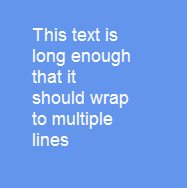
The following code creates a Text instance which wraps its text. Since its `Width` is set to 100 absolute, the wrapped text must fit inside the `TextRuntime`'s absolute width.
```csharp
// Initialize
var text = new TextRuntime();
text.Text = "This text is long enough that it should wrap to multiple lines";
text.Width = 100;
text.WidthUnits = Gum.DataTypes.DimensionUnitType.Absolute;
mainPanel.AddChild(text);
```
Text wrapping within the bounds of a TextRuntime
TextRuntime treats its internal letters as children. If WidthUnits is changed to RelativeToChildren then the text no longer wraps since the TextRuntime sizes itself to contain all letters horizontally as shown in the following code block:
```csharp
// Initialize
var text = new TextRuntime();
text.Text = "This text is long, but it should no longer wrap because WidthUnits=RelativeToChildren";
text.WidthUnits = Gum.DataTypes.DimensionUnitType.RelativeToChildren;
// Width no longer affects wrapping, but it may still be needed to add padding
// if anything else depends on the Text instance's width
mainPanel.AddChild(text);
```
Long text without wrapping
## Text.IsMidWordLineBreakEnabled (XNA-likes only)
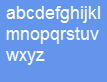
XNA-like environments (MonoGame, FNA, KNI, and FlatRedBall) control whether line wrapping takes place mid-word, or only on whitespace characters. As of June 2025 line wrapping only occurs on whitespace characters, but this behavior can be changed. For example, the following code shows how to set a TextRuntime instance to break apart words when wrapping.
```csharp
// Initialize
var text = new TextRuntime();
// Set this value before changing width-related properties.
// This is a global value, so it is used by all TextRuntime
// instances:
RenderingLibrary.Graphics.Text.IsMidWordLineBreakEnabled = true;
text.Width = 100;
text.WidthUnits = Gum.DataTypes.DimensionUnitType.Absolute;
text.Text = "abcdefghijklmnopqrstuvwxyz";
stackPanel.AddChild(text);
```
Text wrapping mid-word
---
# Agent Instructions
This documentation is published with GitBook. GitBook is the documentation platform designed so that both humans and AI agents can read, navigate, and reason over technical content effectively. Learn more at gitbook.com.
## Querying This Documentation
If you need additional information that is not directly available in this page, you can query the documentation dynamically by asking a question.
Perform an HTTP GET request on the current page URL with the `ask` query parameter, and the optional `goal` query parameter:
```
GET https://docs.flatredball.com/gum/code/standard-visuals/textruntime/text-wrapping.md?ask=&goal=
```
`ask` is the immediate question: it should be specific, self-contained, and written in natural language.
`goal` is optional and describes the broader end goal you are ultimately trying to accomplish on behalf of the user. GitBook uses it to tailor the answer towards what is most useful for that goal.
The response will contain a direct answer to the question and relevant excerpts and sources from the documentation.
Use this mechanism when the answer is not explicitly present in the current page, you need clarification or additional context, or you want to retrieve related documentation sections.